
Step-by-Step Guide: Configuring Azure Red Hat OpenShift (ARO) with a Custom Domain
Setting up a custom domain for your ARO cluster involves both Azure and DNS provider configurations. Follow these steps for a successful setup.
1. Prepare Your Custom Domain
- Choose the domain you want to use (e.g.,
rajeshkumar.xyz). - Ensure you have access to the DNS management portal for your domain.
2. Deploy or Identify Your ARO Cluster
- If you haven’t already, deploy your ARO cluster via the Azure Portal, CLI, or ARM templates.
- Note your cluster’s name and resource group.
3. Retrieve Required ARO IP Addresses
You need two IP addresses:
- API Server IP (for
api.<yourdomain>) - Ingress IP (for
*.apps.<yourdomain>)
Command Line Method:
textaz aro show --name <cluster_name> --resource-group <resource_group> --query "apiserverProfile.ip" -o tsv
az aro show --name <cluster_name> --resource-group <resource_group> --query "ingressProfiles[0].ip" -o tsv
Replace <cluster_name> and <resource_group> with your actual values.
Alternatively, you can get these IPs from the Azure Portal under your ARO cluster’s overview or networking section.
4. Configure DNS Records
In your DNS provider’s portal, create the following A records:
| DNS Record | Points To | Purpose |
|---|---|---|
api.<yourdomain> | API Server IP | OpenShift API endpoint |
*.apps.<yourdomain> | Ingress IP | Console & app routes |
Example:
api.rajeshkumar.xyz→4.240.123.104*.apps.rajeshkumar.xyz→74.225.159.59
5. (Optional) Upload Custom SSL Certificates
- By default, OpenShift uses self-signed certificates for custom domains.
- For production, generate or buy valid SSL certificates for both the API and ingress endpoints.
- Upload these certificates via the OpenShift console or CLI.
6. Test Domain Resolution
- Use
nslookupordigto confirm your DNS records resolve to the correct IPs. - Example: text
nslookup console-openshift-console.apps.rajeshkumar.xyz nslookup api.rajeshkumar.xyz
7. Access the OpenShift Console
- Visit
https://console-openshift-console.apps.<yourdomain>in your browser. - If you see certificate warnings, check your SSL setup.
8. Troubleshooting
- DNS not resolving: Double-check your A records and allow time for DNS propagation.
- SSL errors: Ensure certificates are valid and correctly uploaded.
- Console inaccessible: Confirm that firewall/network rules allow inbound access to the cluster IPs.
Summary Table
| Step | Action Required |
|---|---|
| Prepare Domain | Own/manage custom domain |
| Get ARO IPs | Use Azure CLI/Portal |
| Set DNS Records | Create A records for API & Ingress |
| Upload Certificates | (Optional) For production security |
| Test Access | Use browser & DNS tools |
By following these steps, your Azure Red Hat OpenShift cluster will be accessible via your custom domain, providing a professional and branded experience for users and developers.
Absolutely! Here’s a step-by-step, Azure-native guide for configuring Azure Red Hat OpenShift (ARO) with a custom domain, including DNS and what you must know about network security restrictions.
Step-by-Step: Configure Azure OpenShift (ARO) with a Custom Domain
Step 1: Plan Your Custom Domain and Subdomains
- Decide your root domain (e.g.,
rajeshkumar.xyz). - Plan the following records (examples):
api.rajeshkumar.xyz→ OpenShift API endpoint*.apps.rajeshkumar.xyz→ All OpenShift app routes (console, etc.)- Optionally,
api-int.rajeshkumar.xyzfor internal API.
Step 2: Deploy ARO Cluster with Custom Domain
Option A: Azure Portal
- Go to Create ARO cluster.
- Under Domain, enter your custom domain (e.g.,
rajeshkumar.xyz). - Continue with normal ARO setup (location, node count, vNet, etc.).
- Deploy the cluster.
Option B: Azure CLI
If using ARM/Bicep/Terraform, set the domain property to your custom domain.
Step 3: Wait for ARO Deployment
- ARO will deploy, but will NOT manage your DNS—it assumes you will configure DNS records.
- After deployment, obtain the public IPs for API and Apps endpoints.
Step 4: Find Your Public IP Addresses
- Go to the ARO managed resource group (name starts with
aro-infra-ormc_). - In Azure Portal or CLI:
az network public-ip list -g <MANAGED-RG> -o table - You will see two public IPs, usually named:
*-default-v4(for API)*-pip-v4(for Apps/Router)
Step 5: Create DNS Records at Your Registrar
Go to your domain registrar’s DNS management panel and add:
| Subdomain | Type | Value (Public IP) | Purpose |
|---|---|---|---|
| api. | A | [API Public IP] | API server |
| api-int. (optional) | A | [API Public IP] | Internal API |
| *.apps. | A | [Apps Public IP] | All apps routes |
Example:
| Subdomain | Type | Value |
|---|---|---|
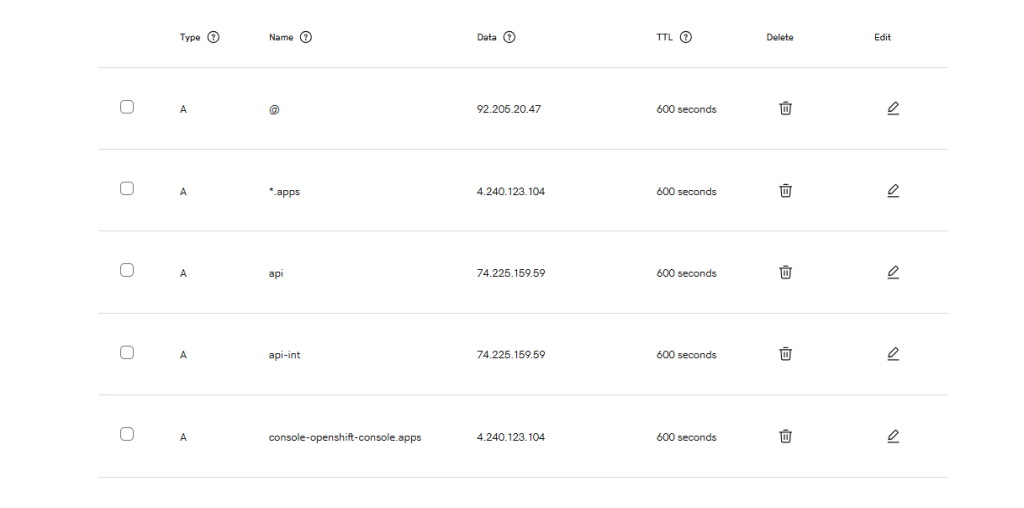
| api.rajeshkumar.xyz | A | 74.225.159.59 |
| api-int.rajeshkumar.xyz | A | 74.225.159.59 |
| *.apps.rajeshkumar.xyz | A | 4.240.123.104 |
Step 6: Wait for DNS Propagation
- Use dnschecker.org to verify DNS records.
Step 7: NSG/Firewall (Critical for Custom Domains!)
Azure ARO managed RGs have locked-down NSGs.
- If port 443 to the Apps/Router public IP is not allowed, you cannot change this yourself.
- If you cannot access the console or app routes after DNS, open an Azure support ticket and request: “Allow inbound TCP 443 from Internet to the APPS/Router public IP (
<your-apps-ip>) in NSG<your-nsg>of managed RG<your-managed-rg>for my custom domain.”
Step 8: Validate Access
- Open your browser to
https://console-openshift-console.apps.<yourdomain>/ - You may see a certificate warning for up to an hour until OpenShift issues a valid TLS cert for your custom domain.
Step 9: (Optional) Configure Email, Branding, etc.
- Optionally update cluster branding and notification settings in the OpenShift console.
Azure Official References
Quick Recap Checklist
- Deploy ARO with custom domain set.
- Note down API and Apps public IPs from managed RG.
- Create required A records at your DNS provider.
- Wait for DNS propagation.
- (If needed) Request Azure to open 443 to your Apps/Router IP in managed RG NSG.
- Access your console and apps via custom domain URLs.
That’s it!
If you need an exact support ticket template, sample DNS config, or troubleshooting guide, just ask!
Absolutely! Here’s a compact cheat sheet of all key Azure CLI commands you’ll use for working with Azure resource groups and for troubleshooting ARO custom domain public IPs, NSGs, and load balancers.
Essential Azure CLI Commands for ARO/Resource Groups
1. List All Resource Groups
az group list -o table
Code language: PHP (php)
2. Show Details of a Resource Group
az group show -n <RESOURCE-GROUP-NAME>
Code language: HTML, XML (xml)
3. Find ARO Managed Resource Group
(If you only know your ARO cluster’s resource group and name):
az aro show -g <YOUR-CLUSTER-RG> -n <YOUR-CLUSTER-NAME> --query "clusterProfile.resourceGroupId"
Code language: HTML, XML (xml)
(Extract the managed RG name from the result.)
4. List All Public IPs in a Resource Group
az network public-ip list -g <MANAGED-RG> -o table
Code language: PHP (php)
5. List All NSGs in a Resource Group
az network nsg list -g <MANAGED-RG> -o table
Code language: HTML, XML (xml)
6. List All Inbound Rules for an NSG
az network nsg rule list -g <MANAGED-RG> --nsg-name <NSG-NAME> -o table
Code language: HTML, XML (xml)
7. List All Load Balancers in a Resource Group
az network lb list -g <MANAGED-RG> -o table
Code language: HTML, XML (xml)
8. Show LB Frontend IP Configuration (see what public IP is attached)
az network lb frontend-ip list -g <MANAGED-RG> --lb-name <LB-NAME> -o table
Code language: HTML, XML (xml)
9. List Subnets in a VNET
az network vnet subnet list -g <MANAGED-RG> --vnet-name <VNET-NAME> -o table
Code language: HTML, XML (xml)
10. List All Public IPs in Your Subscription (across all RGs)
az network public-ip list --query "[].{ResourceGroup:resourceGroup, Name:name, IP:ipAddress}" -o table
Code language: CSS (css)
BONUS: DNS & Connectivity Checks (From any shell)
- Check DNS Resolution
nslookup console-openshift-console.apps.<yourdomain> - Test OpenShift Console Endpoint
curl -vk https://console-openshift-console.apps.<yourdomain>/ - Test OpenShift API Endpoint
curl -vk https://api.<yourdomain>:6443/
Typical Workflow Example
- Find managed RG for your cluster:
az aro show -g DevOpsSchool -n devopsschool --query "clusterProfile.resourceGroupId" - List public IPs in managed RG:
az network public-ip list -g aro-infra-mcyj58v7-devopsschool -o table - List NSGs:
az network nsg list -g aro-infra-mcyj58v7-devopsschool -o table - Check NSG rules:
az network nsg rule list -g aro-infra-mcyj58v7-devopsschool --nsg-name devopsschool-8v55v-nsg -o table - Find which LB is using which public IP:
az network lb frontend-ip list -g aro-infra-mcyj58v7-devopsschool --lb-name <LB-NAME> -o table
If you want an even more detailed script or one-liner to run all at once, let me know!
That’s exactly the problem with ARO and AKS managed resource groups:
Microsoft locks the managed resource group with “Deny Assignments”, so only Microsoft support can make NSG changes in that resource group.
You Cannot:
- Add, remove, or edit NSG rules in the managed RG (
aro-infra-mcyj58v7-devopsschool) - Delete or unlock the deny assignment (it is by Azure policy for managed services)
- Change inbound traffic rules for your public IPs in the managed RG
Why?
- This is by Azure design, so customers can’t accidentally break cluster networking.
- See official docs (“Why can’t I modify objects in the managed resource group?”)
- This is the same for both ARO and AKS.
What Are Your Options?
A. Contact Microsoft Support (Recommended and only supported way)
- This is the only way to add or change NSG rules in the managed resource group for ARO clusters.
B. (Re)Create the Cluster with a Default Domain (temporary workaround)
- If you use the default domain (
<cluster>.<region>.aroapp.io), Azure sets up all DNS and NSG rules for you. - You lose your custom domain, but your cluster will be accessible without support intervention.
C. Wait for Microsoft’s Newer Capabilities (not available as of July 2026)
- Azure is working on making managed resource groups more flexible, but today, only support can do this.
Summary Table
| Task | Possible by You | Possible by Microsoft Support |
|---|---|---|
| Edit NSG in managed RG | ❌ No | ✅ Yes |
| Unlock RG | ❌ No | ❌ No |
| Use default domain | ✅ Yes | N/A |
What to Do Now
- Open a support ticket:
Only Microsoft support can change NSG rules for you, and it’s a known, routine request.
Support Ticket Template (Copy & Paste):
Subject:
ARO Custom Domain: Please open port 443 on APPS Public IP in Managed RG
Body:
Hello,
I have deployed an Azure Red Hat OpenShift (ARO) cluster with a custom domain.
The console and apps endpoints are not accessible because the Network Security Group in the managed resource group does not allow inbound TCP 443 to the APPS/Router public IP.
Please add an allow rule for TCP 443 from Internet (0.0.0.0/0) to 4.240.123.104 in NSG devopsschool-8v55v-nsg (managed RG aro-infra-mcyj58v7-devopsschool).
Thank you.
This is the only way to solve this for any production ARO with a custom domain.
Let me know if you want help opening the ticket or have any questions!

I’m Rajesh Kumar, a DevOps, SRE, DevSecOps, Cloud, and Platform Engineering expert passionate about sharing practical knowledge, real-world experiences, and industry best practices. I have worked at Cotocus and regularly write about technology, travel, investing, health, product reviews, and digital marketing through my various platforms.
I publish technical articles at DevOps School, travel stories at Holiday Landmark, stock market insights at Stocks Mantra, health and fitness guidance at My Medic Plus, product reviews at TrueReviewNow, and SEO and digital marketing strategies at Wizbrand.
Find Trusted Cardiac Hospitals
Compare heart hospitals by city and services — all in one place.
Explore Hospitals
Very informative and practical article! The steps to configure Azure Red Hat OpenShift (ARO) with a custom domain are explained clearly, making it easier for DevOps engineers and cloud practitioners to follow. A valuable guide for setting up OpenShift in real‑world environments.