
REST (Representational State Transfer) was introduced and defined in 2000 by Roy Fielding in his doctoral dissertation. REST is an architectural style for designing distributed systems. It is not a standard but a set of constraints, such as being stateless, having a client/server relationship, and a uniform interface. REST is not strictly related to HTTP, but it is most commonly associated with it
Principles of REST
- Resources expose easily understood directory structure URIs.
- Representations transfer JSON or XML to represent data objects and attributes.
- Messages use HTTP methods explicitly (for example, GET, POST, PUT, and DELETE).
- Stateless interactions store no client context on the server between requests. State dependencies limit and restrict
- scalability. The client holds session state.
HTTP methods
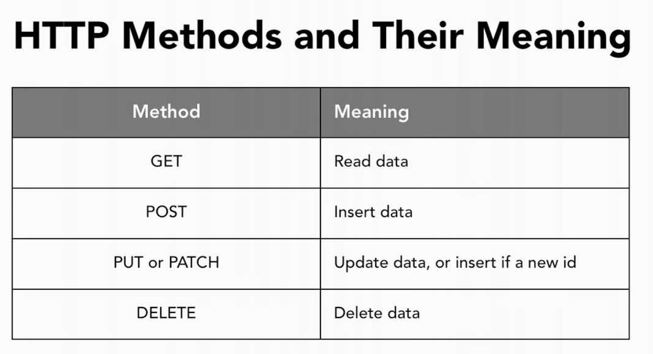
Use HTTP methods to map CRUD (create, retrieve, update, delete) operations to HTTP requests.
GET (Retrieve information)
Retrieve information. GET requests must be safe and idempotent, meaning regardless of how many times it repeats with the same parameters, the results are the same. They can have side effects, but the user doesn’t expect them, so they cannot be critical to the operation of the system. Requests can also be partial or conditional. example
POST (Create + Update)
Request that the resource at the URI do something with the provided entity. Often POST is used to create a new entity, but it can also be used to update an entity.
PUT (Create + Update)
Store an entity at a URI. PUT can create a new entity or update an existing one. A PUT request is idempotent. Idempotency is the main difference between the expectations of PUT versus a POST request.
DELETE (Remove)
Request that a resource be removed; however, the resource does not have to be removed immediately. It could be an asynchronous or long-running request.
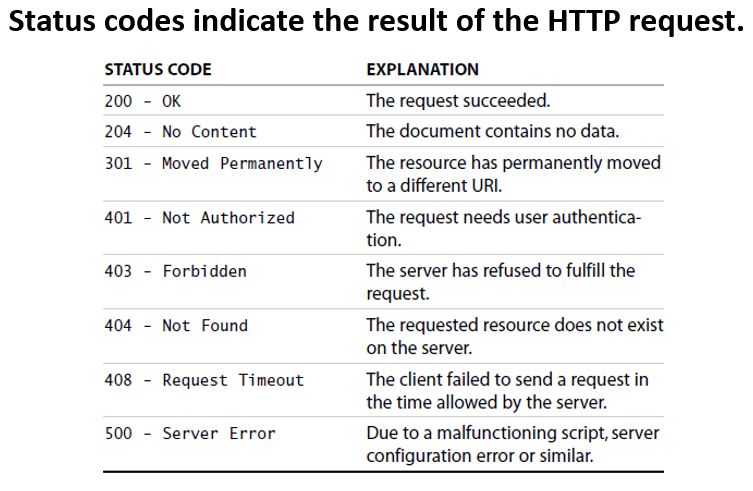
Status codes indicate the result of the HTTP request.
1XX – informational
2XX – success
3XX – redirection
4XX – client error
5XX – server error
PUT vs. POST in RESTful in Elastic Search
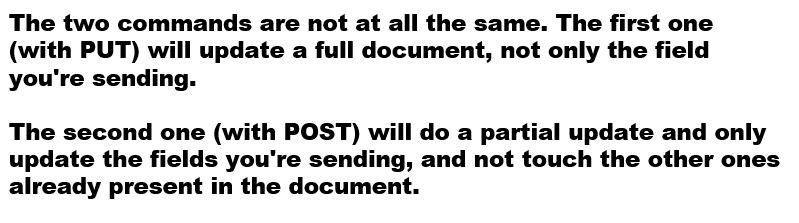
A PUT request is idempotent. Idempotency is the main difference between the expectations of PUT versus a POST request.
PUT implies putting a resource – completely replacing whatever is available at the given URL with a different thing. By definition, a PUT is idempotent. Do it as many times as you like, and the result is the same. x=5 is idempotent.
You can PUT a resource whether it previously exists, or not (eg, to Create, or to Update)!
POST updates a resource and adds a subsidiary resource, or causes a change. A POST is not idempotent, in the way that x++ is not idempotent.
Good read here
https://stackoverflow.com/questions/630453/put-vs-post-in-rest
Overall, The PUT is used for update the existing values and POST is using to insert a new value.
At this URL(PUT) vs under this URL(POST)
PUT verb (“store this document at this URL“), we use the POST verb (“store this document under this URL“).
PUT /website/blog/123
{
  "title": "My first blog entry",
  "text":  "Just trying this out...",
  "date":  "2014/01/01"
}

Code language: JavaScript (javascript)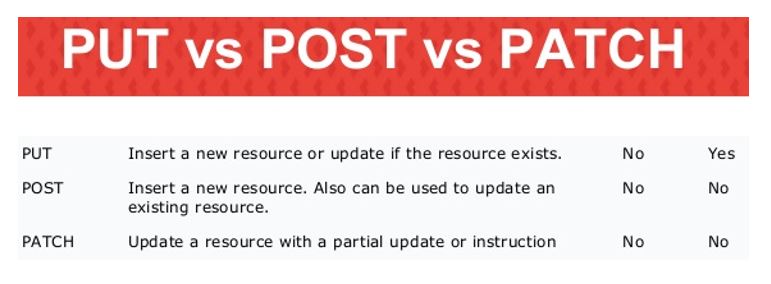
Auto-generation of ids(POST) vs specify an id(PUT)
Autogenerated IDs are 20 character long, URL-safe, Base64-encoded GUID strings. These GUIDs are generated from a modified FlakeID scheme which allows multiple nodes to be generating unique IDs in parallel with essentially zero chance of collision.
Thus, only difference, that a POST can be used to achieve auto-generation of ids whereas a PUT is used when you want to specify an id.
It’s all about REST semantics. POST basically that you are posting a request which is going to modify the server state. POST index/type { “foo”: “bar” } will generate an _id server side and will index the document with this _id.
PUT is used to send a resource to the server. PUT index/type/id { “foo”: “bar” } will put or update a document named index/type/id in the server.

I’m Rajesh Kumar, a DevOps, SRE, DevSecOps, Cloud, and Platform Engineering expert passionate about sharing practical knowledge, real-world experiences, and industry best practices. I have worked at Cotocus and regularly write about technology, travel, investing, health, product reviews, and digital marketing through my various platforms.
I publish technical articles at DevOps School, travel stories at Holiday Landmark, stock market insights at Stocks Mantra, health and fitness guidance at My Medic Plus, product reviews at TrueReviewNow, and SEO and digital marketing strategies at Wizbrand.
Find Trusted Cardiac Hospitals
Compare heart hospitals by city and services — all in one place.
Explore Hospitals