
Introduction
AI Conversation Intelligence for Support platforms help businesses analyze customer conversations across chat, email, voice calls, messaging apps, and support tickets. These tools use artificial intelligence to transcribe conversations, summarize interactions, detect sentiment, monitor agent performance, identify customer risks, and automate support workflows.
Customer support operations are becoming more complex as organizations manage growing ticket volumes, multilingual customers, omnichannel communication, and rising customer expectations. Modern AI conversation intelligence platforms help support teams improve response quality, reduce handling time, identify recurring customer issues, and optimize support operations using real-time insights and automation.
Why It Matters
Support teams now need more than traditional ticketing systems. AI-powered conversation intelligence helps organizations:
- Improve customer satisfaction
- Reduce support costs
- Speed up agent onboarding
- Detect customer frustration earlier
- Automate repetitive workflows
- Improve support quality assurance
- Generate actionable customer insights
- Scale global support operations efficiently
Real World Use Cases
- Real-time agent assistance during live support conversations
- AI-generated call and ticket summaries
- Customer sentiment analysis and escalation detection
- Automated quality assurance scoring
- Coaching and performance monitoring for support agents
- Voice of customer analytics across support channels
- AI-powered workflow routing and prioritization
- Knowledge gap detection and support optimization
Evaluation Criteria for Buyers
Before selecting a platform, buyers should evaluate:
- Accuracy of AI summaries and transcription
- Real-time versus post-interaction analytics
- Omnichannel support capabilities
- AI governance and guardrails
- Data privacy and retention controls
- Workflow automation flexibility
- CRM and help desk integrations
- Reporting and observability features
- Cost management and scalability
- Human review and approval workflows
- Multilingual support quality
- Vendor ecosystem maturity
Best for: enterprise support teams, SaaS companies, BPO providers, healthcare support operations, fintech organizations, telecom providers, and customer experience teams managing large support volumes.
Not ideal for: very small businesses with limited customer interactions, companies without centralized support systems, or teams that only need basic reporting instead of AI-powered conversation intelligence.
What’s Changed in AI Conversation Intelligence for Support
- AI copilots now assist support agents during live customer interactions
- Multimodal AI combines voice, chat, screen activity, and CRM context
- AI systems automatically trigger escalations and workflows
- More vendors now support BYO model flexibility
- AI evaluation and hallucination monitoring are becoming standard
- Support analytics now include token usage and AI cost tracking
- Enterprises demand stronger retention and residency controls
- Human review workflows are replacing fully automated deployments
- AI observability dashboards now monitor latency and reliability
- Prompt injection defense and AI guardrails are increasingly important
- Customer churn prediction is becoming integrated into support analytics
- AI-generated coaching recommendations are improving agent productivity
Quick Buyer Checklist
- Does the platform support voice, chat, email, and messaging channels
- Can it integrate with existing CRM and help desk systems
- Does it support multilingual conversations
- Are AI summaries customizable and accurate
- Is there support for hosted or BYO AI models
- Are evaluation and QA workflows available
- Does the platform include AI guardrails
- Can admins configure retention policies
- Are audit logs and governance controls included
- Does the system provide real-time assistance
- Are cost and token usage visible
- Can data exports reduce vendor lock-in risks
- Does it support scalable enterprise deployments
- Are APIs and workflow automation tools available
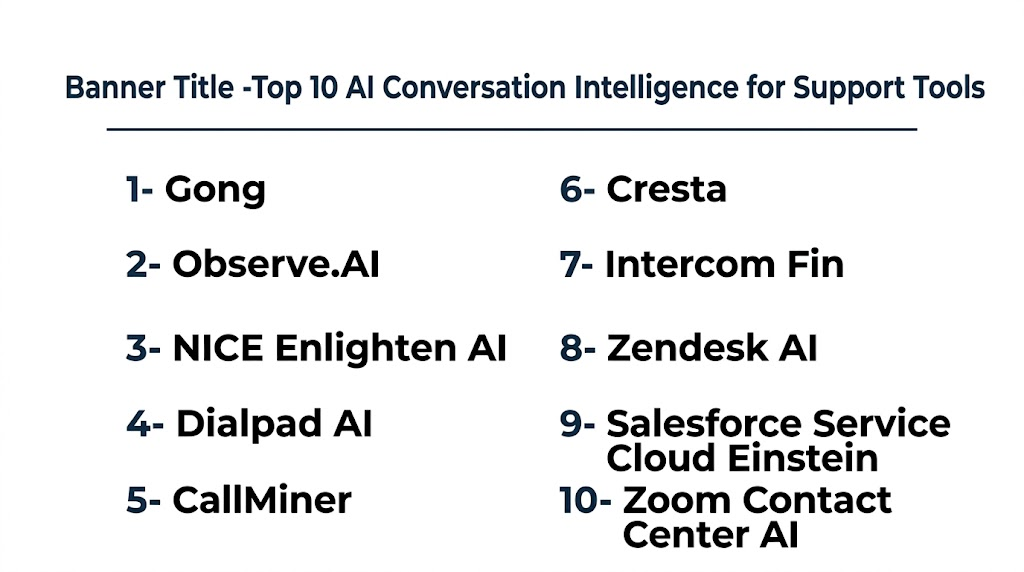
Top 10 AI Conversation Intelligence for Support Tools
1- Gong
One-line verdict: Best for enterprises needing advanced support analytics, coaching, and customer conversation insights.
Short Description
Gong is one of the most recognized conversation intelligence platforms for support and revenue teams. It analyzes customer interactions, generates insights, automates summaries, and helps organizations improve customer experience through AI-driven analytics.
Standout Capabilities
- Advanced conversation analytics
- AI-generated interaction summaries
- Real-time customer insights
- Agent coaching recommendations
- Sentiment detection
- Support performance dashboards
- Escalation risk monitoring
- Cross-channel analytics
AI-Specific Depth
- Model support: Proprietary hosted AI
- RAG and knowledge integration: CRM and support integrations
- Evaluation: QA analytics and conversation scoring
- Guardrails: Varies / N/A
- Observability: Operational dashboards and analytics
Pros
- Strong enterprise analytics
- Mature support intelligence workflows
- Excellent coaching capabilities
Cons
- Premium pricing
- Complex onboarding for small teams
- Advanced workflows require planning
Security & Compliance
Supports enterprise governance controls, encryption, RBAC, retention settings, and audit functionality.
Deployment & Platforms
- Web
- Cloud deployment
- Mobile support available
Integrations & Ecosystem
Gong integrates with leading CRM and support ecosystems to centralize customer interaction intelligence.
- Salesforce
- Zendesk
- HubSpot
- Slack
- Zoom
- Microsoft Teams
- APIs
Pricing Model
Enterprise subscription pricing with tiered licensing.
Best-Fit Scenarios
- Large support organizations
- AI-driven coaching initiatives
- Multi-channel customer analytics
2- Observe.AI
One-line verdict: Best for contact centers focused on automated QA and agent performance optimization.
Short Description
Observe.AI specializes in AI-powered quality assurance and support analytics for contact centers. The platform helps teams automate call reviews, improve compliance monitoring, and optimize agent productivity.
Standout Capabilities
- Automated QA scoring
- Real-time coaching
- Speech analytics
- Compliance monitoring
- AI-driven scorecards
- Sentiment tracking
- Escalation alerts
- Agent productivity insights
AI-Specific Depth
- Model support: Proprietary AI models
- RAG and knowledge integration: CRM integrations
- Evaluation: AI-powered QA scoring
- Guardrails: Compliance-focused controls
- Observability: Support analytics dashboards
Pros
- Excellent QA automation
- Strong coaching features
- Good compliance workflows
Cons
- Primarily contact center focused
- Enterprise-oriented deployment
- Advanced customization can be complex
Security & Compliance
Supports access management, audit controls, and configurable retention policies.
Deployment & Platforms
- Web platform
- Cloud deployment
Integrations & Ecosystem
- Five9
- Genesys
- Zendesk
- Salesforce
- NICE
- APIs
Pricing Model
Enterprise SaaS licensing.
Best-Fit Scenarios
- High-volume contact centers
- Support QA automation
- Compliance-sensitive industries
3- NICE Enlighten AI
One-line verdict: Best for large enterprises requiring advanced customer experience analytics and governance.
Short Description
NICE Enlighten AI combines AI-powered analytics, customer intelligence, and operational monitoring for enterprise contact centers and support organizations.
Standout Capabilities
- Predictive customer insights
- Speech and sentiment analytics
- Workforce optimization
- Automated QA monitoring
- Omnichannel analytics
- AI-driven coaching
- Customer journey analysis
- Compliance monitoring
AI-Specific Depth
- Model support: Hosted AI services
- RAG and knowledge integration: Enterprise CRM integrations
- Evaluation: QA and workflow evaluation tools
- Guardrails: Governance-focused workflows
- Observability: Enterprise analytics dashboards
Pros
- Enterprise scalability
- Strong analytics maturity
- Advanced governance controls
Cons
- Complex implementation
- Premium enterprise pricing
- Requires operational maturity
Security & Compliance
Supports encryption, RBAC, audit logs, retention controls, and enterprise governance capabilities.
Deployment & Platforms
- Cloud
- Hybrid deployment
- Web administration
Integrations & Ecosystem
- NICE CXone
- Salesforce
- Microsoft Dynamics
- ServiceNow
- APIs
- Workforce systems
Pricing Model
Enterprise licensing model.
Best-Fit Scenarios
- Global support organizations
- Compliance-driven enterprises
- Large omnichannel operations
4- Dialpad AI
One-line verdict: Best for SMB and mid-market support teams seeking affordable AI-powered communication analytics.
Short Description
Dialpad AI combines cloud communications, AI summaries, support analytics, and customer interaction intelligence into a unified platform for growing support teams.
Standout Capabilities
- Real-time transcription
- AI-generated summaries
- Live sentiment analysis
- Omnichannel communication
- AI coaching
- Workflow automation
- Unified communications
- Support analytics
AI-Specific Depth
- Model support: Hosted AI
- RAG and knowledge integration: Workspace and CRM integrations
- Evaluation: Basic support analytics
- Guardrails: Varies / N/A
- Observability: Operational dashboards
Pros
- Easy deployment
- Good value for SMBs
- Unified communications platform
Cons
- Limited advanced governance
- Less enterprise depth
- Customization flexibility varies
Security & Compliance
Supports SSO, encryption, and enterprise administration settings.
Deployment & Platforms
- Web
- Windows
- macOS
- iOS
- Android
- Cloud deployment
Integrations & Ecosystem
- Salesforce
- Zendesk
- Google Workspace
- Microsoft 365
- HubSpot
- APIs
Pricing Model
Tiered SaaS subscription.
Best-Fit Scenarios
- SMB customer support
- Fast-growing startups
- Unified communication environments
5- CallMiner
One-line verdict: Best for enterprises prioritizing deep voice analytics and customer sentiment intelligence.
Short Description
CallMiner focuses heavily on speech analytics, customer sentiment analysis, and AI-driven support intelligence for large support organizations.
Standout Capabilities
- Voice analytics
- Customer sentiment tracking
- Compliance monitoring
- AI categorization
- Escalation analysis
- Omnichannel support analytics
- Customer journey visibility
- Risk detection
AI-Specific Depth
- Model support: Proprietary analytics models
- RAG and knowledge integration: Enterprise connectors
- Evaluation: QA and operational scoring
- Guardrails: Compliance-focused workflows
- Observability: Detailed analytics reporting
Pros
- Excellent sentiment analysis
- Mature analytics capabilities
- Strong enterprise support
Cons
- User interface complexity
- Longer onboarding cycles
- Premium pricing structure
Security & Compliance
Enterprise-grade governance, access controls, and audit capabilities supported.
Deployment & Platforms
- Cloud
- Hybrid deployment
- Web administration
Integrations & Ecosystem
- Salesforce
- Genesys
- NICE
- Five9
- APIs
- CRM systems
Pricing Model
Enterprise licensing.
Best-Fit Scenarios
- Voice-heavy support operations
- Compliance-sensitive environments
- Customer experience analytics programs
6- Cresta
One-line verdict: Best for organizations wanting real-time AI guidance for support agents.
Short Description
Cresta provides AI-powered real-time coaching and support intelligence designed to improve customer interactions and agent productivity during live conversations.
Standout Capabilities
- Real-time AI guidance
- Live workflow assistance
- AI-generated recommendations
- Knowledge surfacing
- Support analytics
- Escalation prediction
- Agent coaching
- Conversation summaries
AI-Specific Depth
- Model support: Hosted AI models
- RAG and knowledge integration: Knowledge base integrations
- Evaluation: Workflow analytics
- Guardrails: Human review workflows
- Observability: Operational dashboards
Pros
- Excellent real-time support
- Strong productivity improvements
- Modern support workflows
Cons
- Enterprise-focused pricing
- Smaller ecosystem than larger vendors
- Requires operational planning
Security & Compliance
Supports governance controls, admin management, and encryption settings.
Deployment & Platforms
- Cloud deployment
- Web platform
Integrations & Ecosystem
- Salesforce
- Zendesk
- NICE
- Genesys
- APIs
- Contact center systems
Pricing Model
Enterprise SaaS pricing.
Best-Fit Scenarios
- Real-time support coaching
- AI-assisted contact centers
- Agent productivity optimization
7- Intercom Fin
One-line verdict: Best for AI-first customer support automation and conversational self-service.
Short Description
Intercom Fin combines AI customer support automation with conversation intelligence to help businesses scale digital support experiences.
Standout Capabilities
- AI support assistants
- Knowledge-grounded responses
- Automated support workflows
- AI-generated summaries
- Customer context awareness
- Multilingual support
- Ticket routing
- Omnichannel conversations
AI-Specific Depth
- Model support: Hosted AI services
- RAG and knowledge integration: Native knowledge integrations
- Evaluation: AI interaction monitoring
- Guardrails: Human escalation workflows
- Observability: Workflow analytics
Pros
- Fast deployment
- Modern support experience
- Strong automation workflows
Cons
- Less suitable for voice-heavy operations
- Governance flexibility varies
- AI quality depends on knowledge accuracy
Security & Compliance
Supports enterprise administration and configurable retention settings.
Deployment & Platforms
- Web
- Mobile support
- Cloud deployment
Integrations & Ecosystem
- Salesforce
- Slack
- HubSpot
- Zendesk
- APIs
- Knowledge systems
Pricing Model
Usage-based and seat-based pricing.
Best-Fit Scenarios
- SaaS customer support
- AI self-service initiatives
- Digital-first businesses
8- Zendesk AI
One-line verdict: Best for organizations already running customer support workflows inside Zendesk.
Short Description
Zendesk AI adds AI-powered conversation intelligence, summaries, routing, and automation directly into Zendesk support operations.
Standout Capabilities
- AI-generated ticket summaries
- Automated routing
- Intent detection
- Omnichannel workflows
- AI suggestions
- Support analytics
- Workflow automation
- Knowledge recommendations
AI-Specific Depth
- Model support: Hosted AI
- RAG and knowledge integration: Native Zendesk knowledge integration
- Evaluation: Support analytics and QA
- Guardrails: Human approval workflows
- Observability: Reporting dashboards
Pros
- Easy onboarding
- Strong Zendesk integration
- Good omnichannel support
Cons
- Limited outside Zendesk ecosystem
- Advanced customization varies
- Less analytics depth than specialists
Security & Compliance
Supports enterprise governance, retention settings, and admin controls.
Deployment & Platforms
- Web
- iOS
- Android
- Cloud deployment
Integrations & Ecosystem
- Slack
- Salesforce
- Jira
- Shopify
- APIs
- Marketplace applications
Pricing Model
Tiered SaaS pricing.
Best-Fit Scenarios
- Zendesk-centric support teams
- SMB and mid-market support
- Fast AI enablement projects
9- Salesforce Service Cloud Einstein
One-line verdict: Best for enterprises combining CRM intelligence and AI-powered customer support workflows.
Short Description
Salesforce Service Cloud Einstein integrates AI conversation intelligence with CRM automation, analytics, and enterprise support operations.
Standout Capabilities
- AI-generated summaries
- Predictive support insights
- Case routing automation
- Omnichannel orchestration
- CRM-native workflows
- AI copilots
- Knowledge recommendations
- Workflow automation
AI-Specific Depth
- Model support: Hosted AI and BYO flexibility within ecosystem
- RAG and knowledge integration: Strong CRM integration
- Evaluation: Operational reporting and analytics
- Guardrails: Enterprise governance workflows
- Observability: Enterprise dashboards
Pros
- Deep CRM integration
- Enterprise scalability
- Large ecosystem
Cons
- Operational complexity
- Premium pricing
- Requires Salesforce expertise
Security & Compliance
Supports encryption, governance workflows, RBAC, audit logging, and retention management.
Deployment & Platforms
- Web
- Mobile applications
- Cloud deployment
Integrations & Ecosystem
- Salesforce ecosystem
- Slack
- MuleSoft
- Service platforms
- APIs
- Enterprise workflows
Pricing Model
Enterprise SaaS subscription with AI add-ons.
Best-Fit Scenarios
- Salesforce-centric enterprises
- Large support organizations
- AI-powered service operations
10- Zoom Contact Center AI
One-line verdict: Best for organizations standardized on Zoom collaboration and support infrastructure.
Short Description
Zoom Contact Center AI combines omnichannel support operations with AI-powered conversation intelligence, summaries, and live assistance.
Standout Capabilities
- Real-time transcription
- AI-generated summaries
- Omnichannel support
- Sentiment analysis
- Live agent assistance
- Supervisor dashboards
- Voice analytics
- Unified collaboration workflows
AI-Specific Depth
- Model support: Hosted AI models
- RAG and knowledge integration: Knowledge integrations available
- Evaluation: QA and interaction analytics
- Guardrails: Varies / N/A
- Observability: Operational dashboards
Pros
- Strong Zoom ecosystem integration
- Easy collaboration workflows
- Unified communication environment
Cons
- Less developer flexibility
- Ecosystem dependency
- Advanced customization varies
Security & Compliance
Supports enterprise access management, encryption, and configurable retention settings.
Deployment & Platforms
- Web
- iOS
- Android
- Cloud deployment
Integrations & Ecosystem
- Zoom Workplace
- Salesforce
- Zendesk
- ServiceNow
- APIs
- CRM systems
Pricing Model
Tiered enterprise pricing.
Best-Fit Scenarios
- Zoom-first enterprises
- Distributed support teams
- Omnichannel support operations
Comparison Table
| Tool Name | Best For | Deployment | Model Flexibility | Strength | Watch-Out | Public Rating |
|---|---|---|---|---|---|---|
| Gong | Enterprise analytics | Cloud | Hosted | Deep conversation insights | Premium pricing | N/A |
| Observe.AI | QA automation | Cloud | Hosted | Automated coaching | Contact center focused | N/A |
| NICE Enlighten AI | Large enterprises | Cloud and Hybrid | Hosted | Enterprise analytics | Complexity | N/A |
| Dialpad AI | SMB support teams | Cloud | Hosted | Unified communications | Limited governance depth | N/A |
| CallMiner | Voice analytics | Cloud and Hybrid | Hosted | Sentiment intelligence | UI complexity | N/A |
| Cresta | Real-time coaching | Cloud | Hosted | Live agent guidance | Enterprise pricing | N/A |
| Intercom Fin | AI self-service | Cloud | Hosted | Digital support automation | Less voice-focused | N/A |
| Zendesk AI | Zendesk users | Cloud | Hosted | Native workflows | Ecosystem dependency | N/A |
| Salesforce Service Cloud Einstein | CRM-centric enterprises | Cloud | Hosted and BYO | CRM integration | Operational complexity | N/A |
| Zoom Contact Center AI | Zoom environments | Cloud | Hosted | Unified communications | Zoom ecosystem dependency | N/A |
Scoring & Evaluation
These scores are comparative and intended to help buyers understand platform strengths across support analytics, AI governance, integrations, and operational scalability. The right choice depends on organizational size, compliance needs, support channels, and AI maturity.
| Tool | Core | Reliability Eval | Guardrails | Integrations | Ease | Performance Cost | Security Admin | Support | Weighted Total |
|---|---|---|---|---|---|---|---|---|---|
| Gong | 9 | 8 | 7 | 9 | 8 | 7 | 8 | 8 | 8.1 |
| Observe.AI | 9 | 8 | 8 | 8 | 7 | 7 | 8 | 8 | 8.0 |
| NICE Enlighten AI | 9 | 9 | 8 | 9 | 6 | 7 | 9 | 8 | 8.3 |
| Dialpad AI | 7 | 7 | 6 | 8 | 9 | 8 | 7 | 7 | 7.5 |
| CallMiner | 8 | 8 | 8 | 8 | 6 | 7 | 8 | 7 | 7.8 |
| Cresta | 8 | 8 | 7 | 8 | 8 | 7 | 8 | 7 | 7.9 |
| Intercom Fin | 8 | 7 | 7 | 8 | 9 | 8 | 7 | 8 | 7.9 |
| Zendesk AI | 8 | 7 | 7 | 9 | 9 | 8 | 8 | 8 | 8.1 |
| Salesforce Service Cloud Einstein | 9 | 8 | 8 | 10 | 6 | 7 | 9 | 8 | 8.3 |
| Zoom Contact Center AI | 8 | 7 | 7 | 8 | 8 | 8 | 8 | 7 | 7.8 |
Top 3 for Enterprise
- NICE Enlighten AI
- Salesforce Service Cloud Einstein
- Gong
Top 3 for SMB
- Dialpad AI
- Zendesk AI
- Intercom Fin
Top 3 for Developers
- Salesforce Service Cloud Einstein
- Zendesk AI
- Intercom Fin
Which AI Conversation Intelligence for Support Tool Is Right for You
Solo Freelancer
Freelancers and very small teams usually do not need advanced enterprise conversation intelligence. Lightweight AI ticket automation and support analytics are often enough.
SMB
SMBs should prioritize affordability, ease of deployment, and automation capabilities. Dialpad AI, Zendesk AI, and Intercom Fin provide balanced functionality for growing teams.
Mid-Market
Mid-market organizations benefit from stronger analytics, coaching, and workflow automation. Gong, Observe.AI, and Cresta are strong options for scaling support operations.
Enterprise
Large enterprises need governance, observability, scalability, and advanced AI analytics. NICE Enlighten AI and Salesforce Service Cloud Einstein are ideal for complex environments.
Regulated Industries
Healthcare, finance, and public sector organizations should prioritize governance, retention controls, audit logging, and human review workflows.
Budget vs Premium
Budget-focused buyers should consider ecosystem-native tools to reduce complexity. Premium platforms provide deeper analytics, advanced observability, and broader workflow automation.
Build vs Buy
Building internally may work for organizations with mature AI engineering teams. Most businesses benefit more from buying established platforms due to integration complexity and governance requirements.
Implementation Playbook 30 60 90 Days
First 30 Days
- Select pilot support teams
- Define success metrics
- Benchmark current support performance
- Validate integrations
- Configure basic governance policies
- Build QA scorecards
- Establish human review workflows
First 60 Days
- Expand deployment
- Configure retention policies
- Add AI evaluation workflows
- Test hallucination handling
- Implement guardrails
- Monitor latency and cost usage
- Improve prompt and workflow management
First 90 Days
- Scale across departments
- Optimize AI routing and inference costs
- Implement advanced observability
- Build executive dashboards
- Strengthen governance controls
- Establish incident response workflows
- Expand automation carefully
Common Mistakes & How to Avoid Them
- Deploying AI without QA benchmarks
- Ignoring hallucination risks
- Over-automating sensitive workflows
- Poor governance planning
- Weak retention controls
- Lack of observability
- No visibility into AI costs
- Skipping multilingual testing
- No human approval workflows
- Vendor lock-in without export strategies
- Weak access management
- No prompt version tracking
- Assuming AI summaries are always accurate
- Failing to retrain support teams
FAQs
1- What is AI conversation intelligence for support
AI conversation intelligence platforms analyze customer interactions across support channels to improve support quality, automate workflows, and generate operational insights.
2- Can these platforms replace support agents
Most tools are designed to assist human agents rather than fully replace them. Human oversight remains important for sensitive customer interactions.
3- Are these tools suitable for small businesses
Some platforms work well for SMBs, especially those with built-in automation and easy onboarding. Enterprise-focused platforms may be too complex for smaller teams.
4- Do these platforms support multilingual conversations
Many enterprise platforms support multiple languages for transcription and sentiment analysis, although quality can vary.
5- What is the difference between conversational AI and conversation intelligence
Conversational AI interacts directly with customers, while conversation intelligence analyzes interactions to improve support operations and customer experience.
6- Can organizations use their own AI models
Some platforms support BYO AI models or integrations with external AI ecosystems. Availability varies by vendor.
7- Why are AI guardrails important
Guardrails help reduce hallucinations, unsafe responses, and compliance risks in AI-assisted support workflows.
8- What should buyers evaluate first
Organizations should first evaluate integrations, governance controls, support analytics, and AI accuracy.
9- Are self-hosted deployments available
Most vendors focus on cloud deployments, although some enterprise platforms offer hybrid deployment models.
10- How do these tools improve customer satisfaction
They improve response consistency, reduce handling times, automate repetitive tasks, and help agents respond more effectively.
11- What are the biggest operational risks
Major risks include poor AI accuracy, weak governance, unmanaged retention policies, and excessive automation without oversight.
12- Can AI conversation intelligence reduce support costs
Yes. Automation, improved workflows, and better support visibility can reduce operational costs when deployed correctly.
Conclusion
AI Conversation Intelligence for Support platforms are becoming essential for organizations that want to improve customer experience, support efficiency, and operational visibility. Modern platforms now combine AI copilots, support analytics, workflow automation, governance, and observability into unified support ecosystems. The best solution depends on company size, support complexity, compliance requirements, and existing technology investments. Enterprise organizations often prioritize governance and analytics depth, while SMBs focus on usability and deployment simplicity. Before making a final decision, organizations should shortlist a few platforms, run controlled pilots using real support conversations, validate security and AI evaluation capabilities, and then scale gradually with strong governance and human oversight practices.

Find Trusted Cardiac Hospitals
Compare heart hospitals by city and services — all in one place.
Explore Hospitals
The article is useful for comparing conversation intelligence tools, but in real support operations the real challenge isn’t analyzing conversations—it’s actually closing the loop between insights and agent behavior. Most platforms can flag sentiment or escalation risk, but teams struggle to turn that into real coaching, workflow changes, or faster resolution times. A more practical approach is integrating these insights directly into QA scoring, live agent assist, and training systems so the data improves outcomes instead of just sitting in dashboards.