
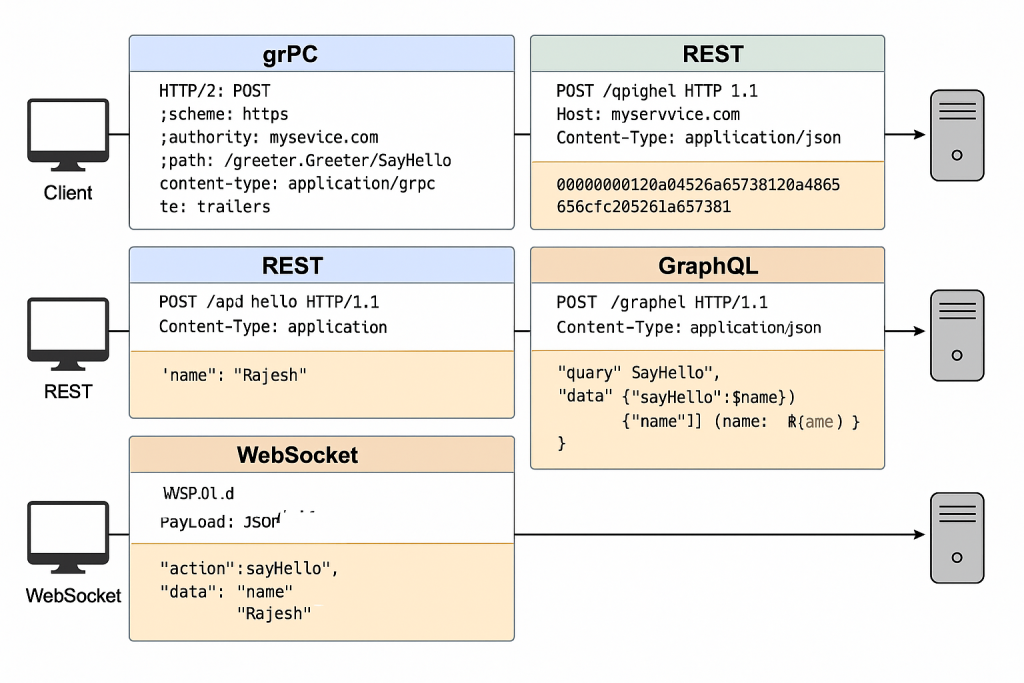
That’s a great question. The reason it’s hard to visually spot the difference in a gRPC request is because it’s a binary protocol over HTTP/2, unlike human-readable formats like REST (JSON) or GraphQL (JSON). But let’s break it down for you in a side-by-side comparison, using the same logical operation — a simple SayHello(name) API — to highlight the key differences:
🧪 1. gRPC Request (Over HTTP/2 + Protobuf)
🔹 Summary:
- Uses HTTP/2 as the transport
- Uses binary Protobuf messages
- Includes custom HTTP/2 headers
🔸 gRPC HTTP/2 Headers:
:method: POST
:scheme: https
:authority: myservice.com
:path: /greeter.Greeter/SayHello
content-type: application/grpc
te: trailers
grpc-timeout: 5S
Code language: JavaScript (javascript)
🔸 Binary Protobuf Payload (Encoded):
00000000120a0452616a657368120a48656c6c6f2c2052616a65736821
⚠️ Note: This payload is not human-readable. It’s a binary encoding of:
message HelloRequest {
  string name = "Rajesh"
}
Code language: JavaScript (javascript)
🧪 2. REST Request (Over HTTP/1.1 + JSON)
🔹 Summary:
- Uses HTTP/1.1
- JSON payload
- Simple headers
🔸 HTTP/1.1 Headers:
POST /api/hello HTTP/1.1
Host: myservice.com
Content-Type: application/json
Code language: HTTP (http)
🔸 JSON Body:
{
  "name": "Rajesh"
}
Code language: JSON / JSON with Comments (json)
✅ Human-readable and easily debuggable.
🧪 3. GraphQL Request (Over HTTP/1.1 + JSON)
🔹 Summary:
- Sends a query/mutation in the body
- Still over HTTP/1.1
🔸 Headers:
POST /graphql HTTP/1.1
Content-Type: application/json
Code language: HTTP (http)
🔸 JSON Body:
{
  "query": "query SayHello($name: String!) { sayHello(name: $name) }",
  "variables": { "name": "Rajesh" }
}
Code language: JSON / JSON with Comments (json)
🧪 4. WebSocket Message (Example Payload)
🔹 Summary:
- Bi-directional persistent connection
- Custom or JSON-encoded data
🔸 JSON Message:
{
  "action": "sayHello",
  "data": {
    "name": "Rajesh"
  }
}
Code language: JSON / JSON with Comments (json)
🧠 Key Differences
| Feature | gRPC | REST | GraphQL | WebSocket |
|---|---|---|---|---|
| Transport | HTTP/2 | HTTP/1.1 | HTTP/1.1 | WebSocket (TCP) |
| Encoding | Protobuf (binary) | JSON | JSON | JSON / Custom |
| Readability | ❌ Not human-readable | ✅ Yes | ✅ Yes | ✅ Yes (usually JSON) |
| Schema Enforcement | ✅ Yes (Protobuf contracts) | ❌ No | ✅ Yes (GraphQL schema) | ❌ Custom per app |
| Streaming | ✅ Native support | ❌ No | 🚫 Only with extra libs | ✅ Native support |
🔍 How to Inspect gRPC Requests
Since gRPC requests are binary:
- Use
grpcurlto simulate or inspect requests - Use
BloomRPCor Postman (gRPC beta) to explore APIs - Add interceptors to log decoded messages in dev
Example with grpcurl:
grpcurl -plaintext localhost:50051 list
grpcurl -d '{"name": "Rajesh"}' -plaintext localhost:50051 greeter.Greeter/SayHello
Code language: PHP (php)
I’m Rajesh Kumar, a DevOps, SRE, DevSecOps, Cloud, and Platform Engineering expert passionate about sharing practical knowledge, real-world experiences, and industry best practices. I have worked at Cotocus and regularly write about technology, travel, investing, health, product reviews, and digital marketing through my various platforms.
I publish technical articles at DevOps School, travel stories at Holiday Landmark, stock market insights at Stocks Mantra, health and fitness guidance at My Medic Plus, product reviews at TrueReviewNow, and SEO and digital marketing strategies at Wizbrand.
Find Trusted Cardiac Hospitals
Compare heart hospitals by city and services — all in one place.
Explore Hospitals