
Here’s your end-to-end, no-gaps guide. I’ll keep the vocabulary crisp and the mental model consistent.
The layers
- Topic: named stream of records.
- Partition: an ordered shard of a topic. Ordering is guaranteed within a partition.
- Consumer group: a logical application reading a topic. As a group, each record is processed once.
- Consumer process (a.k.a. worker / pod / container / JVM): a running OS process that joins a consumer group.
- KafkaConsumer instance: the client object in your code (e.g.,
new KafkaConsumer<>(props)in Java) that talks to brokers, polls, tracks offsets. Kafka assigns partitions to instances. - Thread: execution lane inside a process. You may run zero, one, or many KafkaConsumer instances per process—typically one per thread.
Rule of exclusivity: At any moment, one partition is owned by exactly one KafkaConsumer instance in a group. No two instances in the same group read the same partition concurrently.
Architecture: Topic → Partitions → Consumer Group → Processes → Threads → KafkaConsumer instances
flowchart TB
  %% ===== Topic & Partitions =====
  subgraph T["Topic: orders (6 partitions)"]
    direction LR
    P0(["Partition P0n(offsets: 0..∞)"])
    P1(["Partition P1n(offsets: 0..∞)"])
    P2(["Partition P2n(offsets: 0..∞)"])
    P3(["Partition P3n(offsets: 0..∞)"])
    P4(["Partition P4n(offsets: 0..∞)"])
    P5(["Partition P5n(offsets: 0..∞)"])
  end

  %% ===== Consumer Group =====
  subgraph G["Consumer Group: orders-service"]
    direction TB

    %% ---- Process A (Worker/Pod/Container) ----
    subgraph A["Consumer Process A (Worker A / Pod)"]
      direction TB
      ATh1["Thread 1nKafkaConsumer #1"]
      ATh2["Thread 2nKafkaConsumer #2"]
    end

    %% ---- Process B (Worker/Pod/Container) ----
    subgraph B["Consumer Process B (Worker B / Pod)"]
      direction TB
      BTh1["Thread 1nKafkaConsumer #3"]
    end
  end

  %% ===== Active assignment (example) =====
  P0 -- "assigned to" --> ATh1
  P3 -- "assigned to" --> ATh1

  P1 -- "assigned to" --> ATh2
  P4 -- "assigned to" --> ATh2

  P2 -- "assigned to" --> BTh1
  P5 -- "assigned to" --> BTh1

  %% ===== Notes / Rules =====
  Rules["Rules:
  • One partition → at most one active KafkaConsumer instance in the group.
  • A KafkaConsumer instance may own 1..N partitions.
  • KafkaConsumer is NOT thread-safe → one thread owns poll/commit for that instance.
  • Ordering is guaranteed per partition (by offset), not across partitions."]
  classDef note fill:#fff,stroke:#bbb,stroke-dasharray: 3 3,color:#333;
  Rules:::note
  G --- Rules
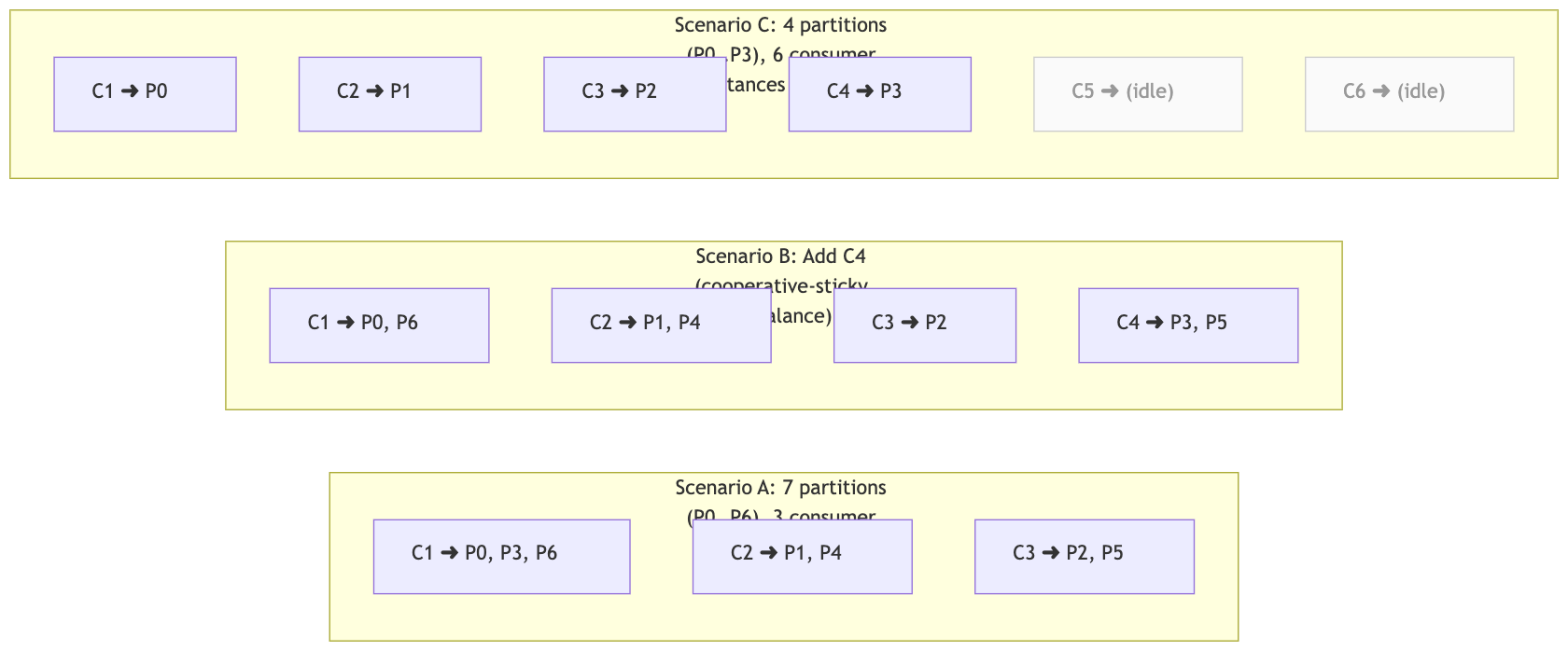
Partition assignment scenarios (how partitions are spread across instances)
flowchart LR
  %% ===== Scenario A =====
  subgraph S1["Scenario A: 7 partitions (P0..P6), 3 consumer instances (C1..C3)"]
    direction TB
    C1A["C1 ➜ P0, P3, P6"]
    C2A["C2 ➜ P1, P4"]
    C3A["C3 ➜ P2, P5"]
  end

  %% ===== Scenario B =====
  subgraph S2["Scenario B: Add C4 (cooperative-sticky rebalance)"]
    direction TB
    C1B["C1 ➜ P0, P6"]
    C2B["C2 ➜ P1, P4"]
    C3B["C3 ➜ P2"]
    C4B["C4 ➜ P3, P5"]
  end

  %% ===== Scenario C =====
  subgraph S3["Scenario C: 4 partitions (P0..P3), 6 consumer instances (C1..C6)"]
    direction TB
    C1C["C1 ➜ P0"]
    C2C["C2 ➜ P1"]
    C3C["C3 ➜ P2"]
    C4C["C4 ➜ P3"]
    C5C["C5 ➜ (idle)"]
    C6C["C6 ➜ (idle)"]
  end

  classDef idle fill:#fafafa,stroke:#ccc,color:#999;
  C5C:::idle; C6C:::idle
Best practices & limitations (mind map)
mindmap
  root((Partitioning and assignment))
    Assignment strategies
      Range
        Contiguous ranges per topic
        Can skew when topics or partition counts differ
      Round robin
        Even spread over time
        Less stable across rebalances
      Sticky
        Keeps prior mapping to reduce churn
      Cooperative sticky
        Incremental rebalance with fewer pauses
        Recommended default in modern clients
    Best practices
      Plan partition count
        Estimate peak throughput in MB per second
        Target around 1 to 3 MB per second per partition
        Add 1.5 to 2x headroom
      Keying
        Key by entity to preserve per key order
        Avoid hot keys and ensure good spread
        Use a custom consistent hash partitioner if needed
      Stability
        Use static membership with group.instance.id
        Use cooperative sticky assignor
      Ordering safe processing
        Per partition single thread executors
        Or per key serial queues on top of a worker pool
        Track contiguous offsets and commit after processing
      Backpressure
        Bounded queues with pause and resume when saturated
        Keep poll loop fast and do IO on worker threads
      Consumer safety
        KafkaConsumer is not thread safe
        One consumer instance per poll and commit thread
        Disable auto commit and commit on completion
    Limitations and trade offs
      No global order across partitions
      Max parallelism per group equals number of partitions
      Hot partitions bottleneck throughput
      Too many partitions increase metadata and rebalance time
      Changing partition count remaps hash of key modulo N
How messages land in partitions (with/without keys)
flowchart TB
  subgraph Prod["Producer"]
    direction TB
    K1["send(key=A, value=m1)"]
    K2["send(key=B, value=m2)"]
    K3["send(key=A, value=m3)"]
    K4["send(key=C, value=m4)"]
  end

  subgraph Partitions["Topic: orders (3 partitions)"]
    direction LR
    X0["P0noffsets 0..∞"]
    X1["P1noffsets 0..∞"]
    X2["P2noffsets 0..∞"]
  end

  note1["Default partitioner:npartition = hash(key) % numPartitionsn(no key ⇒ sticky batching across partitions)"]
  classDef note fill:#fff,stroke:#bbb,stroke-dasharray: 3 3,color:#333;
  note1:::note

  Prod --- note1
  K1 --> X1
  K2 --> X0
  K3 --> X1
  K4 --> X2

  subgraph Order["Per-partition order"]
    direction LR
    X1o["P1 offsets:n0: m1(A)n1: m3(A)"]
    X0o["P0 offsets:n0: m2(B)"]
    X2o["P2 offsets:n0: m4(C)"]
  end

  X1 --> X1o
  X0 --> X0o
  X2 --> X2o
What is a partition?
- Core idea: A partition is one append-only log that belongs to a topic.
- Physical & logical:
- Logical shard for routing and parallelism (clients see “P0, P1, …”).
- Physical files on a broker (leader) with replicas on other brokers for HA.
- Offsets: Every record in a partition gets a strictly increasing offset (0,1,2,…).
Ordering is guaranteed within that partition (by offset). There is no global order across partitions.How messages are placed into partitions
Producers decide the target partition using a partitioner:
- If you set a key (
producer.send(topic, key, value)):
→ Kafka uses a hash of the key:partition = hash(key) % numPartitions.
- All messages with the same key go to the same partition → preserves per-key order.
- Watch out for hot keys (one key getting huge traffic) → one partition becomes a bottleneck.
- If you don’t set a key (key = null):
- The default Java producer uses a sticky partitioner (since Kafka 2.4): it sends a batch to one partition to maximize throughput, then switches.
- Older behavior was round-robin. Either way, distribution is roughly even over time but not ordered across partitions.
You can also plug a custom partitioner if you need special routing (e.g., consistent hashing).
Example: 7 messages into a topic with 3 partitions
Assume topic
ordershas partitions: P0, P1, P2.A) No keys (illustrative round-robin for clarity)
Messages:
m1, m2, m3, m4, m5, m6, m7A simple spread might look like:
P0: m1 (offset 0), m4 (1), m7 (2) P1: m2 (offset 0), m5 (1) P2: m3 (offset 0), m6 (1)Code language: HTTP (http)Notes:
- Each partition has its own offset sequence starting at 0.
- Consumers reading P0 will always see m1 → m4 → m7.
But there’s no defined order between (say) m2 on P1 and m3 on P2.B) With keys (so per-key order holds)
Suppose keys:
A,B,A,C,B,A,Gfor messagesm1..m7.
(Using a simple illustration ofhash(key)%3, say A→P1, B→P0, C→P2, G→P2.)P0: m2(B, offset 0), m5(B, 1) P1: m1(A, offset 0), m3(A, 1), m6(A, 2) P2: m4(C, offset 0), m7(G, 1)Code language: HTTP (http)Notes:
- All A events land on P1, so A’s order is preserved (m1 → m3 → m6).
- All B events land on P0, etc.
- If you later change the partition count,
hash(key) % numPartitionschanges → future records for the same key may map to a different partition (ordering across time can “jump” partitions). Plan for that (see best practices).Why partitions matter (consumers)
- In a consumer group, one partition → one active consumer instance at a time.
Max parallelism per topic per group = number of partitions.- A single KafkaConsumer instance can own multiple partitions, and it will deliver records from each partition in the correct per-partition order.
Best practices for partitioning
- Choose keys deliberately
- If you need per-entity order (e.g., per user/order/account), use that entity ID as the key.
- Ensure keys are well-distributed to avoid hot partitions.
- Plan partition count with headroom
- Start with enough partitions for peak throughput + 1.5–2× headroom.
- Rule of thumb capacity: ~1–3 MB/s per partition (varies by infra).
- Avoid frequent partition increases if strict per-key order must hold over long time frames.
- Adding partitions can remap keys → future events for a key may go to a new partition.
- If you must scale up, consider creating a new topic with more partitions and migrating producers/consumers in a controlled way (or implement a custom consistent-hash partitioner).
- Monitor skew
- Watch per-partition bytes in/out, lag, and message rate.
- If a few partitions are hot, re-evaluate your key choice or increase partitions (with the caveat above).
Limitations & gotchas
- No global ordering: Only within a partition. Don’t build logic that needs cross-partition order.
- Hot keys: One key can bottleneck an entire partition (and thus your group’s parallelism).
- Too many partitions: Faster parallelism, but increases broker memory/files, metadata load, rebalance time, recovery time.
- Changing partition count: Remaps keys (default partitioner) → can disrupt long-lived per-key ordering assumptions.
TL;DR
- A partition is the storage + routing unit of a topic: an append-only log with its own offsets.
- Producers choose the partition (by key hash or sticky/round-robin when keyless).
- Consumers read partitions independently; order only exists within a partition.
- Pick keys and partition counts intentionally to balance order, throughput, and operational overhead.
“KafkaConsumer is NOT thread-safe” — what this actually means
- You must not call
poll(),commitSync(),seek(), etc. on the same KafkaConsumer instance from multiple threads. - Safe patterns:
- One consumer instance on one thread (single-threaded polling).
- One consumer instance per thread (multi-consumer, multi-thread).
- One polling thread + worker pool: the poller thread owns the consumer and hands work to other threads; only the poller commits.
Unsafe patterns (don’t do these): two threads calling poll() on the same instance; one thread polling while another commits on the same instance.
How partitions get assigned (and re-assigned)
- When a consumer group starts (or changes), the group coordinator performs an assignment: it maps topic partitions → consumer instances.
- Triggers for rebalance: a consumer joins/leaves/crashes, subscriptions change, partitions change, a consumer stops heartbeating (e.g., blocked poll loop).
- Lifecycle callbacks (Java):
onPartitionsRevoked→ you must finish/flush and commit work for those partitions → thenonPartitionsAssigned.
Assignment strategies (high-level)
- Range: assigns contiguous ranges per topic—can skew if topics/partitions per topic differ.
- RoundRobin: cycles through partitions → consumers—more even across topics.
- Sticky: tries to keep prior assignments stable across rebalances (reduces churn).
- CooperativeSticky: best default today—incremental rebalances; consumers give up partitions gradually, minimizing stop-the-world pauses.
Best practice: Use CooperativeSticky + static membership (stable
group.instance.id) so transient restarts don’t trigger full rebalances.
What an assignment can look like (concrete scenarios)
Example A: 7 partitions, 3 consumer instances (C1, C2, C3)
A balanced round-robin/sticky outcome might be:
- C1: P0, P3, P6
- C2: P1, P4
- C3: P2, P5
Example B: add a 4th consumer (C4) → incremental rebalance
- Previous owner of a partition will relinquish one:
- C1: P0, P6
- C2: P1, P4
- C3: P2
- C4: P3, P5
Example C: more consumers than partitions
- 4 partitions, 6 consumers → 2 consumers sit idle (assigned nothing). Adding instances beyond partition count does not increase read parallelism.
Concurrency inside a worker (safe blueprints)
Pattern A — Per-partition serial executors (simple & safe)
- Each assigned partition is processed by its own single-thread lane.
- Preserves partition ordering trivially.
- Good when you key by entity (e.g.,
orderId) so ordering matters.
Pattern B — Per-key serialization over a shared pool (higher throughput)
- Maintain tiny FIFO queues per key (or per partition+key) and execute them on a larger thread pool.
- Each key is processed serially; many keys run in parallel.
- Add LRU capping to avoid unbounded key maps.
- Good for I/O-bound workloads with hot partitions/keys.
Don’t spray records from the same partition to an unkeyed pool—this breaks ordering.
CPU-bound vs I/O-bound sizing (practical math)
Let:
R= records/sec per consumer instanceT= average processing time per record (seconds)
Required concurrency ≈ R × T (Little’s Law).
- CPU-bound → thread pool ≈ #vCPUs of the machine (oversubscribing just burns context switches). Consider batching records to use caches well.
- I/O-bound → pool ≈
R × T × safety(safety = 1.5–3×), with per-partition or per-key caps to preserve order.
Example (I/O-bound):
R = 400 rec/s, T = 50 ms (0.05s) → R×T = 20 concurrent.
With safety ×2 → ~40 async slots/threads total. If the instance has 8 partitions, cap ≈ 5 in-flight per partition (8×5=40).
Commit strategy (don’t lose or duplicate)
enable.auto.commit=false- Track highest contiguous processed offset per partition.
- Only commit when all records up to that offset are completed.
- In
onPartitionsRevoked, finish in-flight work for those partitions (or fail fast to DLQ) and commit; otherwise you’ll reprocess on reassignment.
Backpressure & stability
- Keep the poll loop responsive; don’t block it on I/O/CPU.
- Use bounded executor queues. If full, pause the partition(s) (
consumer.pause(tps)) and resume when drained. - Tune:
max.poll.records(e.g., 100–1000)max.poll.interval.mshigh enough for bursts (e.g., 10–30 min)session.timeout.ms/heartbeat.interval.msfor network realitiesfetch.max.bytes/max.partition.fetch.bytesto avoid giant polls
- Prefer cooperative-sticky assignor. Enable static membership to avoid rebalances on restarts.
Partition count: choosing, best practices, and limits
Choosing a number
- Estimate peak throughput: msgs/sec × avg size → MB/s.
- Target per-partition throughput (conservative baseline): 1–3 MB/s (varies by infra).
- Partitions ≈
(needed MB/s) / (target MB/s per partition)→ round up. - Add 1.5–2× headroom for spikes and rebalances.
Best practices
- Parallelism ceiling is #partitions. Don’t run more active consumers than partitions.
- Pre-create partitions with growth headroom (increasing later is possible but usually triggers rebalances and requires producer/consumer awareness).
- Key by entity to distribute load uniformly and preserve per-key order (avoid hot keys).
- Monitor skew: per-partition lag, bytes in/out, processing latency. Re-key or add partitions if one partition is hot.
- Keep counts reasonable: very high partition counts increase broker memory/FD usage, recovery time, metadata size, and rebalance duration.
Limitations and trade-offs
- Too few partitions → can’t scale reads; hotspots.
- Too many partitions → longer leader elections, slower startup, large metadata, longer catch-up after failures, more open files on brokers.
- One partition ⇒ one active consumer in a group: extra consumers sit idle.
- Ordering vs. throughput: strict ordering reduces concurrency (by partition or by key).
- Exactly-once is only native within Kafka (transactions). When writing to external DBs, use idempotent upserts/outbox patterns for “effectively once.”
Configuration checklist (consumer-side)
group.id=your-app-groupenable.auto.commit=falsepartition.assignment.strategy=org.apache.kafka.clients.consumer.CooperativeStickyAssignormax.poll.records=100..1000(tune)max.poll.interval.ms=600000..1800000(10–30 min if you have bursts)session.timeout.ms=10000..45000,heartbeat.interval.ms≈(session/3)fetch.max.bytes,max.partition.fetch.bytessized to your records- Static membership (Java): set
group.instance.idto a stable value per instance - For backpressure: use
pause()/resume()and bounded queues
Two canonical designs (pick one and stick to it)
A) One consumer instance per thread (strict order, simple)
- N threads → N KafkaConsumer instances → Kafka assigns partitions to each.
- Each instance processes assigned partitions serially or via per-partition single-thread executors.
- Easiest way to keep ordering and keep rebalances straightforward.
B) One consumer thread + worker pool (I/O heavy)
- Single KafkaConsumer instance on a dedicated poller thread.
- Poller dispatches to a bounded worker pool.
- Maintain per-partition or per-key serialization layer to preserve required order.
- Commit only after workers complete up to the commit barrier.
Worked sizing example
Goal: ~10 MB/s input. Avg record size 5 KB → ~2,000 records/sec total.
Plan for 2 consumer processes, expect fairly even split → ~1,000 rec/s per process.
- Target 2 MB/s per partition → need ~5 partitions. Add headroom ×2 → 10 partitions.
- With 2 processes, expect ~5 partitions per process.
- If workload is I/O-bound with T ≈ 40 ms:
R×T = 1000×0.04 = 40concurrent. - Pool ≈ 40–80 (safety 1.5–2×). Cap per partition in-flight at 8–12.
- Set
max.poll.records=500, cooperative-sticky assignor, static membership, bounded queues, pause/resume.
Do’s and Don’ts (fast checklist)
Do
- Use CooperativeStickyAssignor + static membership.
- Keep the poll loop responsive; commit manually after processing.
- Bound queues and use pause/resume for backpressure.
- Use per-partition or per-key serialization to preserve order.
- Monitor lag per partition, processing latency, rebalance events.
Don’t
- Share a KafkaConsumer instance across threads calling
poll()/commit(). - Over-provision consumers beyond the number of partitions (they’ll idle).
- Commit offsets before the corresponding work is finished.
- Let long work starve heartbeats (
max.poll.interval.mstimeouts → rebalances). - Jump to hundreds of partitions without a real need; it raises broker and ops overhead.
TL;DR mental model
- Group = the team.
- Process (worker) = a team member.
- KafkaConsumer instance = the identity that Kafka assigns partitions to.
- Thread = how the member does the work.
- Partitions = the parallel lanes. Max lane count = max read parallelism.

I’m Rajesh Kumar, a DevOps, SRE, DevSecOps, Cloud, and Platform Engineering expert passionate about sharing practical knowledge, real-world experiences, and industry best practices. I have worked at Cotocus and regularly write about technology, travel, investing, health, product reviews, and digital marketing through my various platforms.
I publish technical articles at DevOps School, travel stories at Holiday Landmark, stock market insights at Stocks Mantra, health and fitness guidance at My Medic Plus, product reviews at TrueReviewNow, and SEO and digital marketing strategies at Wizbrand.
Find Trusted Cardiac Hospitals
Compare heart hospitals by city and services — all in one place.
Explore Hospitals





