
Introduction
Enterprise Content Connectors for RAG help AI systems securely access, ingest, sync, and retrieve business content from tools such as document repositories, collaboration apps, CRM systems, ticketing platforms, wikis, file storage systems, databases, emails, and knowledge bases. These connectors are the bridge between enterprise content and retrieval augmented generation systems.
They matter because RAG quality depends on how well business content is connected, cleaned, indexed, permissioned, and refreshed. Without strong connectors, AI assistants may retrieve outdated files, miss important documents, expose restricted content, or produce weak answers. Good connector tooling helps AI systems access the right context from the right systems while preserving metadata, access control, freshness, and governance.
Why It Matters
- Connects enterprise data sources to AI systems
- Improves retrieval augmented generation accuracy
- Keeps AI knowledge fresh and updated
- Preserves permissions and metadata
- Reduces hallucination caused by missing context
- Supports secure enterprise AI assistants
Real-World Use Cases
- Internal AI knowledge assistants
- Enterprise search across SaaS apps
- Customer support answer automation
- Sales enablement copilots
- Legal and compliance document retrieval
- Engineering knowledge search
- HR policy assistants
- IT helpdesk AI systems
Evaluation Criteria for Buyers
- Number and quality of connectors
- Permission-aware retrieval support
- Metadata preservation
- Incremental sync capability
- File type coverage
- API flexibility
- RAG framework compatibility
- Vector database integration
- Security and governance controls
- Sync monitoring and error handling
- Deployment flexibility
- Pricing predictability
Best for: AI engineers, enterprise architects, data platform teams, IT leaders, knowledge management teams, support operations, legal operations, and organizations building secure retrieval augmented generation systems.
Not ideal for: Small teams with only one simple data source, static knowledge bases that rarely change, or projects that do not require enterprise permissions, metadata, or continuous sync.
What’s Changed in Enterprise Content Connectors for RAG
- Permission-aware retrieval is now a core enterprise AI requirement
- Connectors are moving beyond file sync into metadata, access control, and freshness management
- AI copilots need real-time or near-real-time content updates
- RAG pipelines now require source-level traceability and provenance
- Enterprise search is merging with vector search and semantic retrieval
- Connectors increasingly support Slack, Teams, SharePoint, Google Drive, Confluence, Jira, Salesforce, Box, GitHub, and databases
- Content chunking and connector design are becoming tightly linked
- Governance teams now demand audit logs, retention controls, and access visibility
- Retrieval evaluation is being used to test connector quality
- Data residency and retention policies are becoming buyer priorities
- Vendor lock in risk is increasing as connectors become core AI infrastructure
- AI agents need connectors that support secure tool access and contextual retrieval
Quick Buyer Checklist
- Does it connect to your key enterprise systems
- Does it preserve document permissions
- Does it support incremental sync
- Does it capture metadata such as owner, source, date, department, and access level
- Does it integrate with vector databases
- Does it support RAG frameworks
- Can it handle PDFs, docs, tickets, chats, wikis, and structured records
- Does it provide sync logs and failure monitoring
- Does it support role based access control
- Can it run in cloud, self hosted, or hybrid environments
- Is pricing predictable as content volume grows
- Can you export or migrate indexed content later
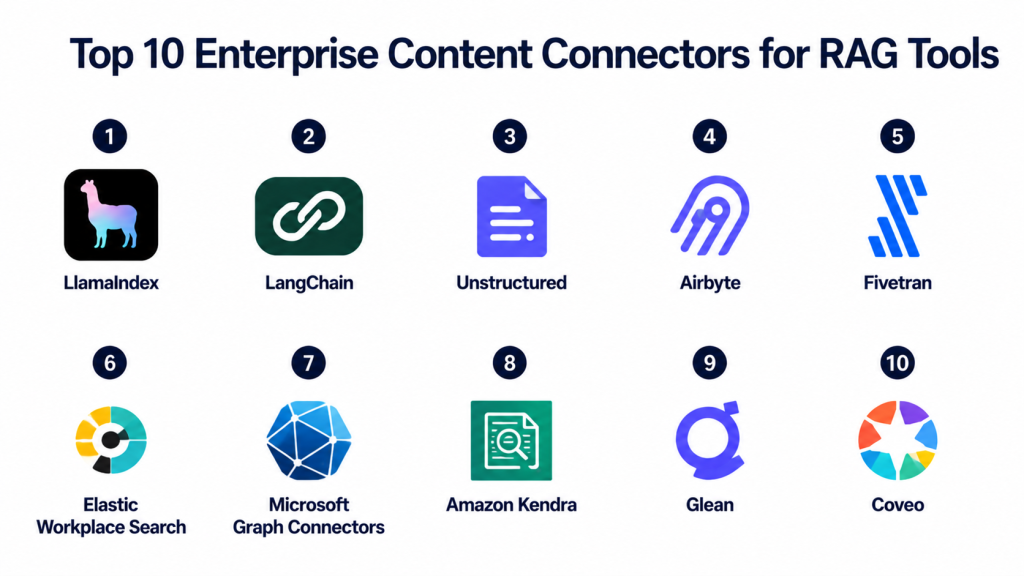
Top 10 Enterprise Content Connectors for RAG Tools
1- LlamaIndex
One-line verdict: Best for developers building flexible RAG connectors across many enterprise content sources.
Short description:
LlamaIndex is a data framework that helps connect enterprise data sources to large language model applications.
It provides loaders, readers, indexing workflows, and retrieval abstractions for RAG systems.
It is useful when teams need to ingest documents, databases, APIs, cloud storage, and knowledge bases into AI applications.
Its biggest strength is flexibility for custom RAG pipelines.
Standout Capabilities
- Broad document loader ecosystem
- Data ingestion pipelines
- Vector database integrations
- Metadata-aware indexing
- Retrieval abstractions
- Query routing workflows
- Custom connector development
- Strong RAG application support
AI-Specific Depth
- Model support: Multi-provider and BYO model workflows
- RAG and knowledge integration: Core strength
- Evaluation: Basic retrieval evaluation capabilities available
- Guardrails: Varies / N/A
- Observability: Depends on connected tooling and deployment
Pros
- Strong RAG developer ecosystem
- Flexible connector architecture
- Works with many vector stores
Cons
- Requires engineering implementation
- Not a managed enterprise connector platform by itself
- Security depends on connected systems and deployment
Security and Compliance
Security depends on deployment, connected data sources, vector stores, and model providers. Certifications are Not publicly stated for the framework itself.
Deployment and Platforms
- Python framework
- Local development
- Cloud application deployment
- API integration workflows
- External vector database support
Integrations and Ecosystem
- Google Drive
- Notion
- Slack
- Confluence
- SharePoint workflows through connectors
- Vector databases
- OpenAI
- Hugging Face
Pricing Model
Open source framework with infrastructure, model provider, storage, and enterprise service costs.
Best-Fit Scenarios
- Custom RAG pipelines
- Enterprise knowledge assistants
- Document ingestion workflows
- Developer-led AI search
- Multi-source retrieval systems
2- LangChain
One-line verdict: Best for orchestrating enterprise content connectors inside AI agents and RAG workflows.
Short description:
LangChain is an AI application framework that connects models, tools, memory, retrievers, vector stores, and enterprise data sources.
It includes document loaders and integration patterns for building RAG and AI agent systems.
It is useful when content connectors are part of a broader application workflow involving tool calling and automation.
Its strength is orchestration across many AI components.
Standout Capabilities
- Document loader ecosystem
- Tool and agent orchestration
- Vector database integrations
- Retriever workflows
- Memory and chain support
- Multi-model workflows
- API integrations
- Large developer ecosystem
AI-Specific Depth
- Model support: Multi-provider and BYO model workflows
- RAG and knowledge integration: Strong support
- Evaluation: Varies depending on ecosystem tooling
- Guardrails: Varies / N/A
- Observability: Tracing available through related ecosystem tools
Pros
- Strong ecosystem coverage
- Excellent for AI workflow orchestration
- Good for agentic RAG systems
Cons
- Can become complex in production
- Not a dedicated connector governance platform
- Requires careful architecture design
Security and Compliance
Security depends on deployment architecture, connected tools, model providers, vector stores, and access control implementation. Certifications are Not publicly stated for the framework itself.
Deployment and Platforms
- Python framework
- JavaScript framework
- Local development
- Cloud application deployment
- API based workflows
Integrations and Ecosystem
- Google Drive
- Slack
- Notion
- GitHub
- Confluence workflows
- Vector databases
- OpenAI
- Anthropic
Pricing Model
Open source framework with costs based on infrastructure, model providers, vector databases, and observability tooling.
Best-Fit Scenarios
- AI agents
- Multi-step RAG applications
- Content-connected copilots
- Custom enterprise AI workflows
- Tool-based retrieval systems
3- Unstructured
One-line verdict: Best for preparing messy enterprise documents for RAG ingestion and indexing.
Short description:
Unstructured helps process enterprise documents and convert them into cleaner structured content for AI systems.
It is especially useful when content comes from PDFs, Word files, HTML, emails, scanned documents, and mixed file repositories.
It works as an ingestion and preprocessing layer before embedding, indexing, and retrieval.
Its strength is handling complex unstructured enterprise content.
Standout Capabilities
- Document parsing
- Multi-format file processing
- OCR workflows
- Layout-aware extraction
- Metadata enrichment
- Partitioning and cleaning
- RAG-ready output preparation
- API and open source options
AI-Specific Depth
- Model support: BYO model workflows and external AI integrations
- RAG and knowledge integration: Strong document preparation support
- Evaluation: Varies / N/A
- Guardrails: Varies / N/A
- Observability: Pipeline visibility depends on deployment
Pros
- Strong for complex document preparation
- Useful for enterprise content archives
- Good fit before vector indexing
Cons
- Connector coverage depends on setup
- Production workflows may need engineering effort
- Advanced governance varies by deployment
Security and Compliance
Security depends on deployment and plan. Access controls, encryption, retention, and audit workflows should be verified directly. Certifications are Not publicly stated unless confirmed by vendor.
Deployment and Platforms
- Cloud
- Self hosted options
- API access
- Python workflows
- Enterprise deployment options
Integrations and Ecosystem
- LangChain
- LlamaIndex
- Vector databases
- Cloud storage
- Document repositories
- RAG pipelines
- Enterprise file systems
Pricing Model
Open source and commercial options. Pricing varies by usage, volume, deployment model, and enterprise requirements.
Best-Fit Scenarios
- Enterprise document preparation
- Complex PDF ingestion
- RAG preprocessing
- Scanned document pipelines
- Multi-format content ingestion
4- Airbyte
One-line verdict: Best for syncing enterprise applications and databases into AI-ready data pipelines.
Short description:
Airbyte is a data integration platform with a large connector ecosystem for moving data from SaaS apps, databases, APIs, and cloud systems.
It is not a RAG framework by itself, but it is highly useful for moving enterprise content into downstream AI pipelines.
When combined with chunking, embedding, and vector indexing tools, it becomes a strong ingestion layer.
Its biggest advantage is broad connector coverage.
Standout Capabilities
- Broad connector catalog
- SaaS and database sync
- Open source and cloud options
- Incremental sync workflows
- ELT pipeline support
- API and database connectors
- Data pipeline monitoring
- Useful for enterprise source integration
AI-Specific Depth
- Model support: N/A
- RAG and knowledge integration: Useful as upstream ingestion layer
- Evaluation: N/A
- Guardrails: Varies / N/A
- Observability: Sync logs and pipeline monitoring available
Pros
- Strong connector ecosystem
- Useful for recurring syncs
- Good for structured and semi-structured sources
Cons
- Not a native chunking or embedding tool
- Needs downstream AI pipeline components
- RAG quality depends on the full architecture
Security and Compliance
Access control, encryption, workspace permissions, and governance vary by deployment and plan. Certifications should be verified directly.
Deployment and Platforms
- Cloud
- Self hosted
- API workflows
- Database connectors
- Enterprise data infrastructure
Integrations and Ecosystem
- Databases
- Warehouses
- SaaS apps
- Cloud storage
- APIs
- Data lakes
- Downstream AI pipelines
Pricing Model
Open source and cloud pricing options. Costs depend on sync volume, connector usage, infrastructure, and enterprise requirements.
Best-Fit Scenarios
- Enterprise data source ingestion
- SaaS system sync
- Structured data for RAG
- Data pipeline automation
- Multi-source content movement
5- Fivetran
One-line verdict: Best for managed enterprise data connectors feeding governed AI and RAG pipelines.
Short description:
Fivetran is a managed data movement platform that syncs data from enterprise applications, databases, and SaaS tools into destinations such as warehouses and lakes.
It is widely used by enterprise data teams that want reliable managed connectors with lower maintenance overhead.
For RAG, it works best as an upstream data ingestion layer before transformation, chunking, embedding, and indexing.
Its strength is managed reliability for business data pipelines.
Standout Capabilities
- Managed enterprise connectors
- Automated schema handling
- Incremental data sync
- Database and SaaS ingestion
- Data warehouse integration
- Pipeline monitoring
- Enterprise reliability
- Lower connector maintenance burden
AI-Specific Depth
- Model support: N/A
- RAG and knowledge integration: Useful upstream data movement layer
- Evaluation: N/A
- Guardrails: Varies / N/A
- Observability: Sync monitoring and operational visibility available
Pros
- Managed connector reliability
- Strong enterprise data pipeline fit
- Reduces maintenance workload
Cons
- Not a native RAG platform
- Needs downstream processing and indexing
- Pricing can increase with data movement volume
Security and Compliance
Enterprise security, access controls, encryption, audit capabilities, and compliance options vary by plan and deployment. Details should be verified directly.
Deployment and Platforms
- Cloud
- Managed data movement
- Enterprise data warehouse workflows
- API and database integrations
- SaaS source connectors
Integrations and Ecosystem
- Data warehouses
- Databases
- SaaS apps
- Cloud storage
- Analytics platforms
- AI pipeline destinations through downstream tools
Pricing Model
Usage based pricing generally tied to data movement and connector activity. Exact pricing varies by plan and enterprise agreement.
Best-Fit Scenarios
- Managed enterprise data sync
- Business system ingestion
- AI data foundation pipelines
- Governed analytics to AI workflows
- Teams wanting low connector maintenance
6- Elastic Workplace Search
One-line verdict: Best for enterprise content search connectors inside the Elastic ecosystem.
Short description:
Elastic Workplace Search helps organizations connect workplace content sources into searchable enterprise experiences.
It is useful for teams already using Elastic search and analytics infrastructure.
For RAG use cases, it can support content discovery and enterprise search workflows that feed retrieval systems.
Its value is strongest when paired with Elastic’s broader search and observability ecosystem.
Standout Capabilities
- Workplace content connectors
- Enterprise search workflows
- Elastic ecosystem integration
- Search relevance tuning
- Content source indexing
- Access control workflows
- Search analytics
- API based integrations
AI-Specific Depth
- Model support: External embeddings and AI integrations
- RAG and knowledge integration: Supported through Elastic search and retrieval workflows
- Evaluation: Varies / N/A
- Guardrails: Enterprise controls vary by deployment
- Observability: Strong Elastic observability ecosystem
Pros
- Strong enterprise search foundation
- Good fit for Elastic users
- Useful workplace content indexing
Cons
- Best value inside Elastic ecosystem
- Setup can require search expertise
- Connector depth varies by source
Security and Compliance
RBAC, encryption, SSO, and audit capabilities may be available depending on Elastic deployment and subscription. Certifications and residency controls vary.
Deployment and Platforms
- Cloud
- Self hosted
- Web management
- API access
- Elastic infrastructure
Integrations and Ecosystem
- Elastic search stack
- Enterprise content sources
- Analytics systems
- AI retrieval workflows
- Observability tools
- Custom connectors
Pricing Model
Subscription and usage based pricing depending on deployment, storage, search workload, and enterprise features.
Best-Fit Scenarios
- Enterprise workplace search
- Elastic-based AI retrieval
- Internal knowledge search
- Content indexing workflows
- Search analytics with RAG
7- Microsoft Graph Connectors
One-line verdict: Best for Microsoft ecosystem enterprises connecting workplace content into AI and search experiences.
Short description:
Microsoft Graph Connectors help organizations bring external enterprise content into Microsoft search and productivity experiences.
They are especially useful for companies heavily invested in Microsoft enterprise infrastructure.
For RAG systems, they can support secure content discovery and metadata-aware enterprise retrieval workflows.
Their biggest value is Microsoft ecosystem alignment and identity-aware access.
Standout Capabilities
- Microsoft ecosystem integration
- Enterprise content indexing
- Identity-aware access
- Metadata mapping
- Search integration
- External content source support
- Governance alignment
- Workplace productivity workflows
AI-Specific Depth
- Model support: Microsoft AI ecosystem workflows
- RAG and knowledge integration: Useful for Microsoft-centric retrieval systems
- Evaluation: Varies / N/A
- Guardrails: Microsoft governance controls available
- Observability: Admin and search visibility vary by setup
Pros
- Strong Microsoft alignment
- Useful permission-aware indexing
- Good fit for enterprise productivity systems
Cons
- Microsoft ecosystem dependency
- Advanced custom RAG workflows may need extra engineering
- Connector behavior varies by source
Security and Compliance
Security aligns with Microsoft identity, access, and governance controls depending on configuration. Certifications and compliance depend on Microsoft services and tenant setup.
Deployment and Platforms
- Cloud
- Microsoft enterprise environment
- Admin configuration workflows
- API integrations
- Workplace search experiences
Integrations and Ecosystem
- Microsoft Search
- Microsoft 365
- SharePoint
- Teams
- Enterprise content systems
- Microsoft AI workflows
Pricing Model
Pricing depends on Microsoft licensing, tenant configuration, and connected services.
Best-Fit Scenarios
- Microsoft enterprise search
- Workplace knowledge discovery
- Identity-aware retrieval
- Microsoft AI copilots
- Enterprise content indexing
8- Amazon Kendra
One-line verdict: Best for AWS teams needing enterprise search connectors and intelligent document retrieval.
Short description:
Amazon Kendra is an enterprise search service designed to connect, index, and retrieve information from business content sources.
It supports connectors for common enterprise repositories and helps build intelligent search experiences.
For RAG workflows, it can function as a retrieval layer or upstream knowledge discovery system.
It is best for AWS-first enterprises that need managed search and connector support.
Standout Capabilities
- Enterprise search service
- Content source connectors
- Semantic search workflows
- Access control support
- AWS ecosystem integration
- Managed indexing
- Query relevance features
- Document retrieval workflows
AI-Specific Depth
- Model support: Managed AWS AI workflows and external integrations
- RAG and knowledge integration: Useful retrieval layer for AWS AI systems
- Evaluation: Varies / N/A
- Guardrails: AWS governance controls available
- Observability: Cloud monitoring integrations available
Pros
- Strong AWS ecosystem fit
- Managed enterprise search
- Useful connector support
Cons
- AWS dependency
- May be less flexible than custom RAG stacks
- Costs can grow with index and query volume
Security and Compliance
AWS IAM, encryption, access controls, logging, and governance features are available depending on configuration. Certifications vary by service and region.
Deployment and Platforms
- Cloud
- AWS managed service
- API access
- Enterprise search workflows
- AWS infrastructure
Integrations and Ecosystem
- AWS services
- Enterprise content repositories
- Document stores
- AI workflows
- Search applications
- RAG pipelines
Pricing Model
Cloud usage pricing based on indexing, storage, queries, and feature usage.
Best-Fit Scenarios
- AWS enterprise search
- Managed content connectors
- Intelligent document retrieval
- RAG retrieval layer
- Enterprise knowledge systems
9- Glean
One-line verdict: Best for permission-aware workplace content connectors and enterprise AI search.
Short description:
Glean is an enterprise AI search platform that connects workplace systems and helps employees retrieve internal knowledge.
It focuses on permission-aware search across apps such as collaboration tools, documents, tickets, and knowledge systems.
For RAG use cases, it is useful as an enterprise knowledge access layer.
Its strength is secure workplace retrieval with business context.
Standout Capabilities
- Enterprise workplace connectors
- Permission-aware retrieval
- AI-powered enterprise search
- Unified knowledge discovery
- Source metadata preservation
- User context awareness
- Enterprise assistant workflows
- Workplace productivity focus
AI-Specific Depth
- Model support: Managed AI workflows
- RAG and knowledge integration: Strong workplace retrieval support
- Evaluation: Search analytics available
- Guardrails: Enterprise permission controls supported
- Observability: Usage analytics and monitoring available
Pros
- Strong workplace search experience
- Good enterprise connector coverage
- Permission-aware retrieval focus
Cons
- Less flexible for custom developer pipelines
- Enterprise subscription pricing
- Best suited for internal knowledge use cases
Security and Compliance
Enterprise access controls, permissions, governance, and security workflows are available depending on plan and deployment. Certifications should be verified directly.
Deployment and Platforms
- Cloud
- Enterprise SaaS
- Web application
- API integrations
- Workplace search workflows
Integrations and Ecosystem
- Google Workspace
- Microsoft 365
- Slack
- Jira
- Confluence
- Salesforce
- Enterprise knowledge systems
Pricing Model
Enterprise subscription pricing based on deployment scope and features.
Best-Fit Scenarios
- Internal enterprise search
- Workplace AI assistants
- Permission-aware knowledge retrieval
- Employee productivity systems
- Enterprise copilots
10- Coveo
One-line verdict: Best for enterprise AI search connectors with relevance tuning and personalization.
Short description:
Coveo is an AI-powered enterprise search and relevance platform that connects enterprise content and delivers personalized search experiences.
It is used in customer support, ecommerce, workplace search, and knowledge management workflows.
For RAG, it can support secure retrieval and relevance-optimized enterprise content access.
Its strength is combining content connectors with AI ranking and personalization.
Standout Capabilities
- Enterprise content connectors
- AI-powered relevance
- Personalized search experiences
- Search analytics
- Customer support integrations
- Ecommerce search support
- Enterprise knowledge retrieval
- Relevance tuning workflows
AI-Specific Depth
- Model support: Managed AI relevance workflows
- RAG and knowledge integration: Strong enterprise retrieval support
- Evaluation: Relevance analytics available
- Guardrails: Enterprise governance varies by plan
- Observability: Search analytics and monitoring support
Pros
- Strong relevance optimization
- Good enterprise connector ecosystem
- Useful for support and ecommerce workflows
Cons
- Enterprise pricing complexity
- Less open source flexibility
- Advanced configuration may require expertise
Security and Compliance
Enterprise access controls, encryption, governance, and security integrations vary by plan and deployment.
Deployment and Platforms
- Cloud
- Enterprise SaaS
- API access
- Web administration
- Enterprise application integrations
Integrations and Ecosystem
- Salesforce
- Service platforms
- Ecommerce systems
- Enterprise content repositories
- Knowledge bases
- AI search workflows
Pricing Model
Enterprise subscription pricing based on deployment scale, features, and usage.
Best-Fit Scenarios
- Enterprise AI search
- Customer support retrieval
- Ecommerce content discovery
- Relevance-optimized RAG
- Personalized knowledge access
Comparison Table
| Tool | Best For | Deployment | Key Strength | Pricing Model | Ideal Buyer |
|---|---|---|---|---|---|
| LlamaIndex | Custom RAG connectors | Framework | Flexible ingestion | Open source plus infra costs | AI developers |
| LangChain | Agentic RAG workflows | Framework | AI orchestration | Open source plus infra costs | AI engineering teams |
| Unstructured | Complex document ingestion | Cloud and self hosted | Document preprocessing | Open source plus commercial | Enterprise AI teams |
| Airbyte | Source system sync | Cloud and self hosted | Connector ecosystem | Open source plus cloud | Data engineering teams |
| Fivetran | Managed enterprise data sync | Cloud | Low maintenance connectors | Usage based | Enterprise data teams |
| Elastic Workplace Search | Enterprise search connectors | Cloud and self hosted | Elastic ecosystem | Subscription based | Search teams |
| Microsoft Graph Connectors | Microsoft workplace content | Cloud | Identity-aware indexing | Microsoft licensing based | Microsoft enterprise teams |
| Amazon Kendra | AWS enterprise search | Cloud | Managed search connectors | Cloud usage pricing | AWS teams |
| Glean | Workplace AI search | Cloud | Permission-aware retrieval | Enterprise subscription | Knowledge teams |
| Coveo | AI relevance and connectors | Cloud | Personalized search | Enterprise subscription | Support and commerce teams |
Scoring and Evaluation Table
| Tool | Connector Coverage | RAG Fit | Ease of Use | Scalability | Security Readiness | Observability | Value | Weighted Total |
|---|---|---|---|---|---|---|---|---|
| LlamaIndex | 8 | 9 | 8 | 7 | 6 | 7 | 8 | 7.6 |
| LangChain | 8 | 9 | 7 | 7 | 6 | 8 | 8 | 7.5 |
| Unstructured | 7 | 9 | 7 | 8 | 7 | 7 | 8 | 7.6 |
| Airbyte | 9 | 7 | 8 | 9 | 8 | 8 | 8 | 8.1 |
| Fivetran | 9 | 6 | 9 | 9 | 8 | 8 | 7 | 8.0 |
| Elastic Workplace Search | 7 | 7 | 7 | 8 | 8 | 9 | 7 | 7.6 |
| Microsoft Graph Connectors | 7 | 7 | 8 | 8 | 9 | 7 | 7 | 7.7 |
| Amazon Kendra | 8 | 8 | 8 | 8 | 9 | 8 | 7 | 8.0 |
| Glean | 9 | 8 | 9 | 8 | 9 | 8 | 7 | 8.3 |
| Coveo | 8 | 8 | 7 | 8 | 8 | 8 | 7 | 7.7 |
Top 3 Tools for Enterprise
1- Glean
Best for enterprises needing permission-aware workplace connectors and AI-powered internal search across many business systems.
2- Amazon Kendra
Best for AWS-focused organizations needing managed enterprise search connectors and secure document retrieval.
3- Fivetran
Best for enterprise data teams that need reliable managed connectors for business systems and analytics-ready AI pipelines.
Top 3 Tools for SMB
1- LlamaIndex
Best for SMB teams building custom RAG systems with flexible content ingestion and retrieval workflows.
2- Airbyte
Best for SMBs needing open source connector flexibility and recurring source syncs.
3- Unstructured
Best for teams processing mixed document formats and preparing files for AI retrieval.
Top 3 Tools for Developers
1- LlamaIndex
Best for developers building RAG ingestion, indexing, and retrieval workflows from multiple content sources.
2- LangChain
Best for developers building agentic AI workflows that need connectors, tools, vector stores, and memory.
3- Airbyte
Best for developers and data teams needing open source connectors for SaaS apps, APIs, and databases.
Which Tool Is Right for You
For custom RAG pipelines
Choose LlamaIndex if you want flexible ingestion, indexing, and retrieval workflows that can be customized by developers.
For AI agents and orchestration
Choose LangChain if content connectors are part of a broader AI workflow involving agents, tools, memory, and automation.
For complex document preprocessing
Choose Unstructured if your enterprise content includes PDFs, emails, forms, scanned files, and messy document formats.
For broad source syncing
Choose Airbyte if you need open source connectors across databases, SaaS apps, APIs, and cloud systems.
For managed enterprise data movement
Choose Fivetran if your team wants reliable managed connectors with minimal maintenance.
For Microsoft enterprise environments
Choose Microsoft Graph Connectors if your content and identity systems are centered around Microsoft productivity tools.
For AWS enterprise search
Choose Amazon Kendra if you need managed enterprise search and connectors inside AWS infrastructure.
For workplace knowledge retrieval
Choose Glean if your priority is employee-facing enterprise search with permission-aware retrieval.
For relevance and personalization
Choose Coveo if customer support, ecommerce, or personalized enterprise search is a key requirement.
For Elastic search environments
Choose Elastic Workplace Search if your team already uses Elastic and wants connected enterprise search workflows.
Implementation Playbook
First 30 Days
- Identify all enterprise content sources
- Prioritize high-value systems such as docs, wikis, tickets, chats, CRM, and support content
- Select three connector tools for pilot testing
- Map permissions and metadata requirements
- Build a small sync pipeline
- Test document freshness and retrieval accuracy
- Validate chunking and indexing strategy
Next 60 Days
- Add incremental sync workflows
- Preserve source metadata and ownership
- Connect ingestion to vector databases or search systems
- Add permission-aware filtering
- Build monitoring for failed syncs and stale content
- Test retrieval augmented generation quality
- Add audit logging and governance workflows
Next 90 Days
- Scale connectors across enterprise systems
- Add role based access control
- Implement reindexing and resync workflows
- Create dashboards for sync status and retrieval quality
- Optimize cost and latency
- Test production workloads with real users
- Finalize governance, retention, and migration policies
Common Mistakes and How to Avoid Them
1- Ignoring permissions
RAG systems can expose sensitive content if permissions are not preserved. Always sync access controls and enforce them during retrieval.
2- Connecting too many sources too early
Start with high-value content sources before expanding to every enterprise system.
3- Poor metadata design
Metadata helps filtering, freshness, ownership, and governance. Capture source, author, department, permission level, and update status.
4- No sync monitoring
Failed syncs create stale AI knowledge. Track sync errors, duplicates, and outdated records.
5- Treating connectors as the full RAG system
Connectors move content, but RAG also needs parsing, chunking, embeddings, indexing, retrieval, evaluation, and governance.
6- Ignoring document freshness
AI assistants can provide wrong answers if content is outdated. Use incremental sync and freshness checks.
7- Weak source prioritization
Not every system deserves indexing first. Prioritize high-value, trusted, frequently used content.
8- Missing access control testing
Test retrieval using different user roles to ensure restricted content is not exposed.
9- No migration plan
Connector platforms can become deeply embedded. Plan export, migration, and fallback options early.
10- Ignoring retrieval evaluation
Connector success should be measured by answer quality, not just successful data sync.
Frequently Asked Questions
1- What are Enterprise Content Connectors for RAG?
Enterprise Content Connectors for RAG connect business systems such as documents, wikis, tickets, chats, CRM, and databases to retrieval augmented generation pipelines. They help AI systems access trusted enterprise content.
2- Why are content connectors important for RAG?
RAG systems depend on fresh and relevant context. Connectors ensure enterprise content is synced, indexed, permissioned, and available for AI retrieval.
3- What content sources should teams connect first?
Teams should start with high-value knowledge sources such as documentation, support tickets, internal wikis, product manuals, policies, and customer knowledge bases.
4- Which tool is best for enterprise workplace content?
Glean, Microsoft Graph Connectors, Amazon Kendra, and Coveo are strong enterprise options depending on ecosystem, governance, and search needs.
5- Which tool is best for developers?
LlamaIndex, LangChain, and Airbyte are strong developer choices because they provide flexible ingestion and integration workflows.
6- Do connectors handle chunking automatically?
Some tools support preprocessing, but many connector tools only sync content. Chunking usually requires additional document processing or RAG framework logic.
7- How do connectors preserve permissions?
Enterprise connectors may sync access metadata from source systems and apply those permissions during search or retrieval. This must be tested carefully before production.
8- What is incremental sync?
Incremental sync updates only new or changed content instead of reprocessing everything. It helps keep AI systems fresh while reducing cost and processing time.
9- What is the biggest risk with enterprise RAG connectors?
The biggest risk is exposing restricted or outdated content. Strong access control, metadata, audit logs, and sync monitoring are essential.
10- How should teams evaluate connector quality?
Teams should test sync reliability, metadata quality, permission handling, document freshness, retrieval accuracy, latency, and operational monitoring using real enterprise content.
Conclusion
Enterprise Content Connectors for RAG are essential for building reliable AI assistants, enterprise search systems, and retrieval augmented generation workflows. They help AI systems access the right business knowledge from the right sources while preserving permissions, metadata, freshness, and governance. Without strong connectors, even the best language model and vector database can produce weak or unsafe results.The best tool depends on your enterprise systems, cloud ecosystem, security needs, and AI maturity. LlamaIndex and LangChain are strong for custom RAG development, Unstructured is useful for preparing messy documents, Airbyte and Fivetran are strong for source data movement, and Glean, Coveo, Amazon Kendra, Microsoft Graph Connectors, and Elastic Workplace Search are better suited for enterprise search and workplace knowledge retrieval. The next step is to shortlist three tools, test them with real business sources, validate permission-aware retrieval, measure answer quality, and scale gradually with strong sync monitoring and governance.

Find Trusted Cardiac Hospitals
Compare heart hospitals by city and services — all in one place.
Explore Hospitals
What’s missing here is the real operational challenge of keeping RAG connectors reliable in dynamic enterprise environments, where source systems (SharePoint, Confluence, Google Drive, ticketing tools) constantly change permissions, schemas, and APIs. In practice, the bigger issue isn’t just connecting data sources, but ensuring freshness, indexing consistency, and access-control synchronization so sensitive content doesn’t leak through retrieval pipelines. The article also doesn’t address incremental ingestion vs full re-indexing costs, which can significantly impact latency and infrastructure expense at scale, nor the challenge of evaluating retrieval quality across heterogeneous connectors where content relevance varies widely by system type and update frequency.