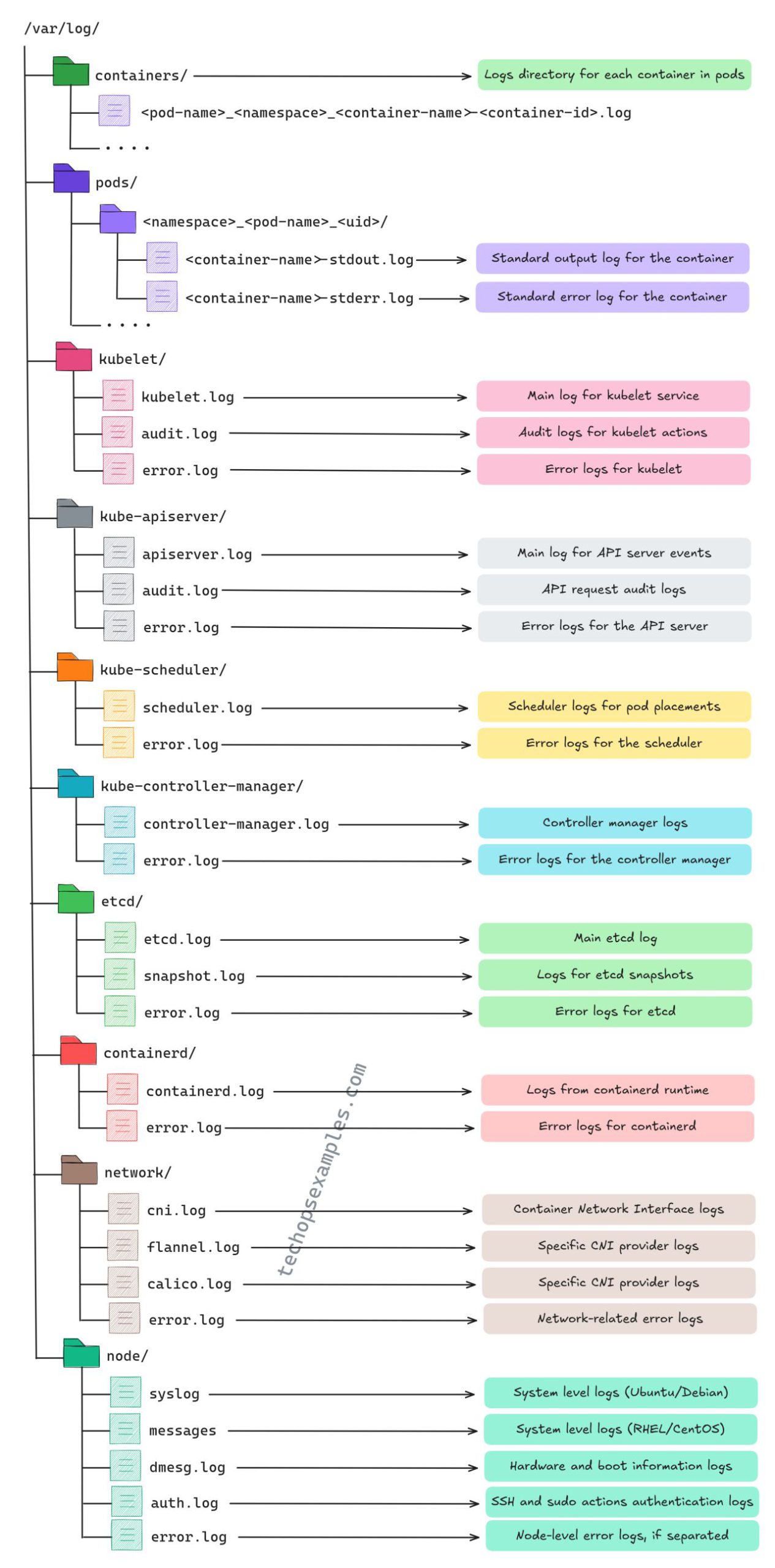
Here is a detailed table summarizing the log file locations, purposes, and use cases for Kubernetes logs:
Comprehensive Table of Kubernetes Logs
| Log Directory/Location | Log File(s) | Purpose | Use Case |
|---|---|---|---|
| /var/log/containers/ | <pod-name>_<namespace>_<container-name>-<container-id>.log | Logs for each container in the pods. | Debugging container-specific issues. |
| /var/log/pods/ | <namespace>_<pod-name>_<uid>/<container-name>-stdout.log<namespace>_<pod-name>_<uid>/<container-name>-stderr.log | stdout.log: Logs standard output.stderr.log: Logs standard error. | Debugging container logs specific to pods. |
| /var/log/kubelet/ | kubelet.logaudit.logerror.log | kubelet.log: Node-level kubelet events.audit.log: Logs kubelet actions.error.log: Kubelet error logs. | Diagnosing issues with pod scheduling and node management. |
| /var/log/kube-apiserver/ | apiserver.logaudit.logerror.log | apiserver.log: API server events.audit.log: API request trails.error.log: API server errors. | Monitoring API requests, failures, and unauthorized access. |
| /var/log/kube-scheduler/ | scheduler.logerror.log | scheduler.log: Logs pod placement decisions.error.log: Scheduler-related errors. | Debugging pod scheduling failures and resource allocation. |
| /var/log/kube-controller-manager/ | controller-manager.logerror.log | controller-manager.log: Logs controller activities.error.log: Errors in controller manager. | Troubleshooting replication, scaling, and resource management. |
| /var/log/etcd/ | etcd.logsnapshot.logerror.log | etcd.log: Main etcd datastore logs.snapshot.log: Logs for etcd snapshots.error.log: Logs etcd errors. | Debugging cluster state synchronization and data corruption issues. |
| /var/log/containerd/ | containerd.logerror.log | containerd.log: Logs container runtime events.error.log: Errors related to container runtime. | Debugging container runtime (image pulling, container start). |
| /var/log/network/ | cni.logflannel.logcalico.logerror.log | cni.log: Container Network Interface logs.flannel/calico.log: Specific network provider logs.error.log: Network errors. | Troubleshooting pod networking and connectivity issues. |
| /var/log/node/ | syslogmessagesdmesg.logauth.logerror.log | syslog/messages: General system logs.dmesg.log: Hardware/boot info.auth.log: SSH and sudo authentication logs.error.log: Node-level error logs. | Debugging hardware, authentication, and boot issues. |
Detailed Explanation of Logs
| Log Type | Component/Service | Key Focus |
|---|---|---|
| Container Logs | Individual Pods/Containers | Application-level logs (stdout and stderr). |
| Node Logs | Kubelet and System Logs | Logs at the node level for resource management. |
| Control Plane Logs | Scheduler, Controller Manager | Logs for cluster-level management and decisions. |
| API Server Logs | API Server | Tracks API requests, errors, and audit trails. |
| Networking Logs | CNI Plugins (Flannel, Calico) | Network-related logs and troubleshooting. |
| Datastore Logs | etcd | Logs related to cluster state storage and retrieval. |
| Runtime Logs | containerd | Logs for container lifecycle management. |
This table provides a clear breakdown of each log directory, its log files, purposes, and common use cases, making it easy for administrators to locate and analyze logs effectively in a Kubernetes environment.
Kubernetes Logging Directory Structure Tutorial
Root Directory (/var/log/)
The main logging directory in Kubernetes contains several important subdirectories:
1. Container Logs
/var/log/containers/Code language: JavaScript (javascript)- Contains logs for each container in pods
- Naming format: -.log
- Useful for debugging individual container issues
2. Pod Logs
/var/log/pods/Code language: JavaScript (javascript)- Contains namespace-specific pod logs
- Structure: /
- Two important log types:
- stdout.log: Standard output logs
- stderr.log: Standard error logs
3. Kubelet Logs
/var/log/kubelet/Code language: JavaScript (javascript)- kubelet.log: Main kubelet service logs
- audit.log: Kubelet action audit logs
- error.log: Kubelet error logs
4. API Server Logs
/var/log/kube-apiserver/Code language: JavaScript (javascript)- apiserver.log: Main API server events
- audit.log: API request audit logs
- error.log: API server error logs
5. Scheduler Logs
/var/log/kube-scheduler/Code language: JavaScript (javascript)- scheduler.log: Pod placement logs
- error.log: Scheduler error logs
6. Controller Manager Logs
/var/log/kube-controller-manager/Code language: JavaScript (javascript)- controller-manager.log: Controller operations
- error.log: Controller manager errors
7. etcd Logs
/var/log/etcd/Code language: JavaScript (javascript)- etcd.log: Main etcd database logs
- snapshot.log: etcd snapshot logs
- error.log: etcd error logs
8. Container Runtime Logs
/var/log/containerd/Code language: JavaScript (javascript)- containerd.log: Container runtime logs
- error.log: Runtime error logs
9. Network Logs
/var/log/network/Code language: JavaScript (javascript)- cni.log: Container Network Interface logs
- flannel.log/calico.log: CNI provider specific logs
- error.log: Network-related errors
10. Node Logs
/var/log/node/Code language: JavaScript (javascript)- syslog: System level logs (Ubuntu/Debian)
- messages: System logs (RHEL/CentOS)
- dmesg.log: Hardware/boot logs
- auth.log: SSH/sudo authentication logs
- error.log: Node-level errors
Best Practices for Log Management
- Regular log rotation to prevent disk space issues
- Implement log aggregation solutions
- Set appropriate log levels
- Use namespace-based log organization
- Monitor error logs frequently
- Implement log retention policies
Common Log Investigation Commands
# View container logs
kubectl logs <pod-name> -n <namespace>

# View previous container logs
kubectl logs <pod-name> -n <namespace> --previous

# Stream logs in real-time
kubectl logs -f <pod-name> -n <namespace>

# View logs with timestamps
kubectl logs <pod-name> -n <namespace> --timestamps=trueCode language: HTML, XML (xml)
This directory structure allows for efficient troubleshooting and monitoring of all components in a Kubernetes cluster, from individual containers to system-level events.

I’m Rajesh Kumar, a DevOps, SRE, DevSecOps, Cloud, and Platform Engineering expert passionate about sharing practical knowledge, real-world experiences, and industry best practices. I have worked at Cotocus and regularly write about technology, travel, investing, health, product reviews, and digital marketing through my various platforms.
I publish technical articles at DevOps School, travel stories at Holiday Landmark, stock market insights at Stocks Mantra, health and fitness guidance at My Medic Plus, product reviews at TrueReviewNow, and SEO and digital marketing strategies at Wizbrand.
Find Trusted Cardiac Hospitals
Compare heart hospitals by city and services — all in one place.
Explore Hospitals